
Open an existing document in Pages
If you can’t open a Pages document, make sure that you have the latest version of Pages from the Mac App Store. If a document is dimmed and can’t be selected, it can’t be opened by Pages.
Note: Pages doesn’t open rich text format (.rtf) file types. You must save .rtf files in another supported file type before opening them in Pages.
Do any of the following:
Double-click a Pages document on your Mac.
Drag a document onto the Pages icon in the Dock or in the Applications folder.
In Pages, choose File > Open Recent (from the File menu at the top of your screen). Pages shows up to the last ten documents you opened—either in iCloud or on your Mac.
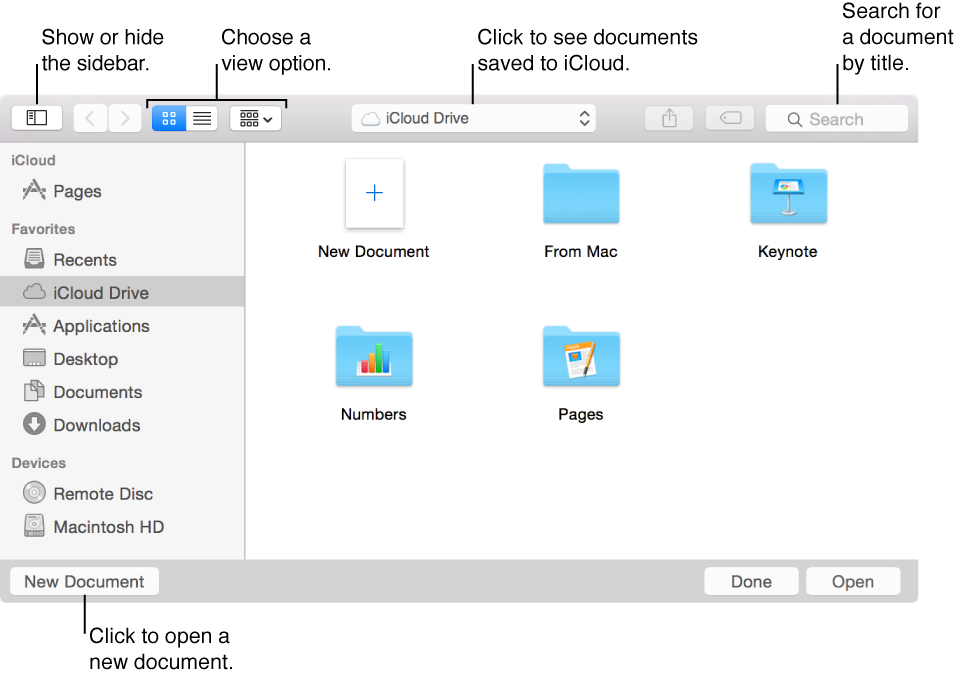
In Pages, choose File > Open, locate and select the document in the dialog that opens, then click Open.
You can use the sidebar on the left side of the Open dialog to look for documents in folders and in places other than your Mac. Use the buttons at the top to change your view.
If your iCloud account is used by other computers and iOS devices that haven’t upgraded to iCloud Drive, syncing will not work in all cases. See this Apple Support article for more information.