Open Pages preferences
Choose Pages > Preferences (from the Pages menu at the top of your screen).
Click General or Rulers at the top of the window to see all settings.
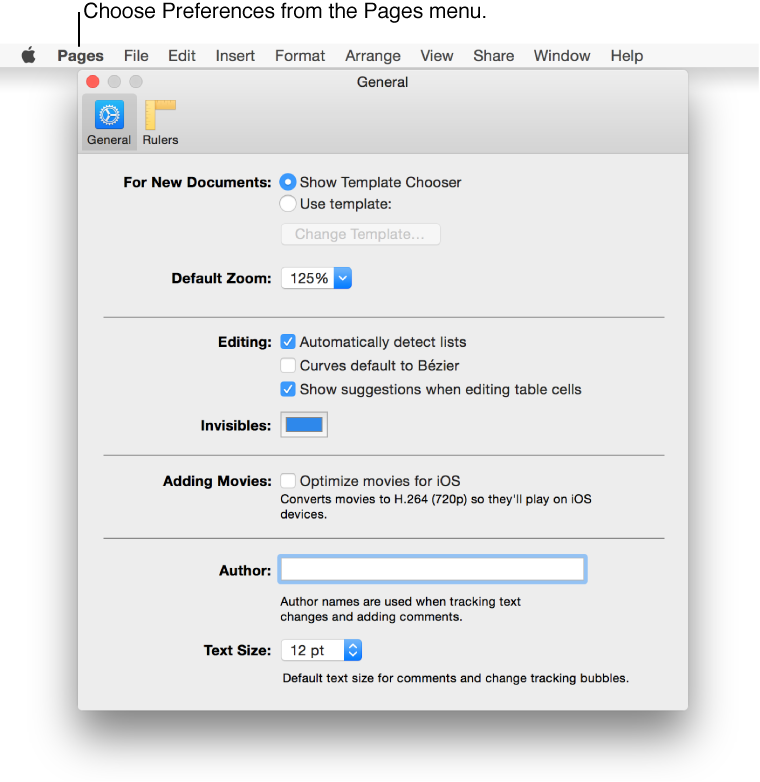

Preference settings affect how Pages behaves, and they apply to all documents. Preferences you can set include:
Ruler units (inches, centimeters, and points) and other ruler settings
Alignment guide color and behavior
The default template (if you always want to start a new document from a particular template that you set)
Automatic list detection
Optimize movies for iOS
The author name for comments
Default text size for comments and change tracking in the sidebar
The color of formatting marks
Bézier curves for objects
Choose Pages > Preferences (from the Pages menu at the top of your screen).
Click General or Rulers at the top of the window to see all settings.