You can track changes to body text in a word-processing document (but not text in text boxes or tables). Changed text appears in a different color than the surrounding text, and change bars appear in the margin. You can choose whether tracked changes are visible, and how they appear.
Turn off tracking: Click , then choose Turn Off Tracking.
You must either accept or reject all changes before you can turn tracking off.
Turn tracking on: Choose Edit > Track Changes (from the Edit menu at the top of your screen). If there are any comments or highlights in the document, you can click Track Changes in the review toolbar above your document.
Pause tracking: Move the slider in the review toolbar to Paused, make your changes, then move the slider to On.
Changes you make while tracking is paused don’t show in the markup.
View or hide tracked changes in the document
The controls for the document and the Comments & Changes sidebar work independently from each other. For example, if you hide changes in the document, you can still show them in the sidebar.
In the review toolbar, click , then choose an option:
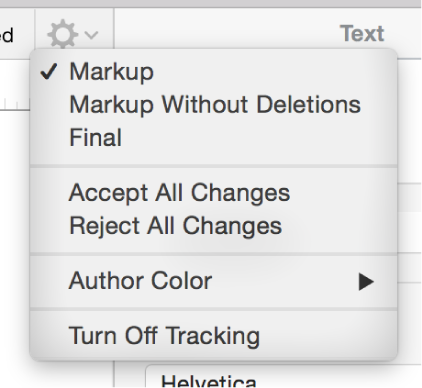
Markup: Displays deletions with a strikethrough and new text in a different color than the surrounding text.
Markup Without Deletions: Displays only the new text in a different color than the surrounding text. Deleted text is hidden.
Final: Displays text without markup, and deleted text is hidden. Pages continues to track changes, so if you change to a different view, you can see them.
Accept or reject changes
To be sure all changes are visible, click in the review toolbar, then set the change tracking view to Markup.
Do any of the following:
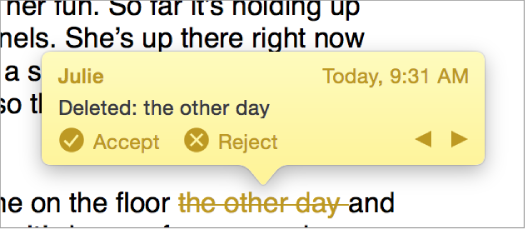
Move the pointer over an instance of marked text, then click Accept or Reject.
Select a range of text, then click Accept or Reject in the review toolbar.
All tracked changes within the range are accepted or rejected at once.
Click in the review toolbar, then choose Accept All Changes or Reject All Changes.
If you accept all changes, markup is removed and the changes are kept. If you reject all changes, markup is removed and the text reverts to the original.
In the Comments & Changes sidebar, click to approve a change or to reject a change.
Manage changes in the Comments & Changes sidebar
You can edit and review changes in the Comments & Changes sidebar that appears in a sidebar on the left side of the Pages window. Comments also appear in the sidebar.
To open the Comments & Changes pane, click on the left side of the review toolbar. Click again to close the sidebar.
You can also click in the toolbar, then choose Show Comments & Changes Pane.
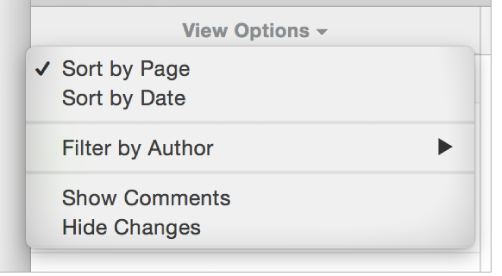
To change what’s shown in the sidebar, click View Options at the top of the sidebar to sort by page or date, filter changes by author, and hide comments or hide changes.
Here are some tips for working in the sidebar:
When you click a change in the sidebar or changed text in the document, the sidebar or the document scrolls so you can see both.
When you move the pointer over a change in the document, a line is drawn between the change and the change rectangle in the sidebar if it’s in view (the sidebar doesn’t scroll). If you don’t see a line connecting a change in the document and its corresponding sidebar item when you move the pointer over it, make sure no sidebar item is selected.
If you choose Sort by Date from View Options and want to reverse the order, choose Sort by Date again.
If you choose Sort by Document from View Options, the sidebar scrolls as you scroll the document.
If you filter changes by author so that your changes aren’t visible in the sidebar, then you make a change, your change appears in the document but doesn’t appear in the sidebar until you change the filter to include your changes, or click Show All at the top of the sidebar.
You can drag the right edge of the sidebar to widen or narrow it.
You can change the size of the text in the sidebar and in comments in Pages > Preferences > General (from the Pages menu at the top of your screen). Click the Text Size pop-up menu and choose a size.

 , then choose Turn Off Tracking.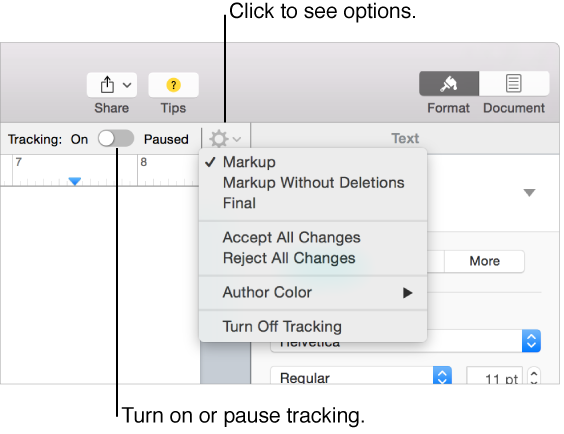
 to approve a change or
  to reject a change.
 on the left side of the review toolbar. Click again to close the sidebar.
 in the