
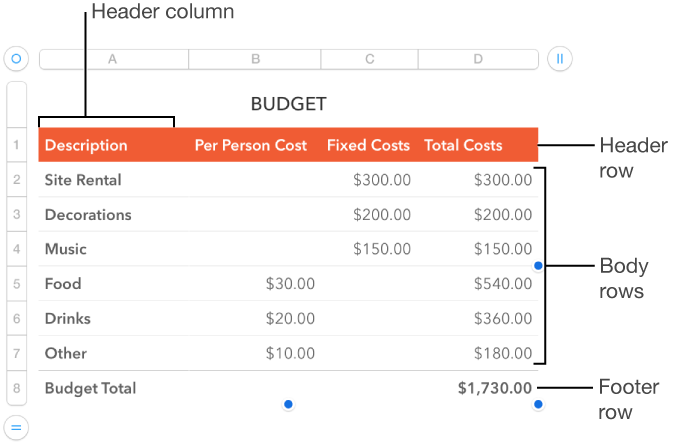
You can add, delete, and rearrange rows and columns in a table. There are three types of rows and columns:
Body rows and columns contain the table data.
Header rows and columns (if any) appear at the top and left side of the table. They usually have a different background color from the body rows, and they’re typically used to identify what the row or column contains.
Footer rows (if any) appear at the bottom of a table, and they can have a different background color from the body rows.
Note: The tasks below apply to a table you add to the page using the  icon in the toolbar. They don’t apply to a page you formatted into columns.
Tap the table, then do any of the following:
Change the number of rows: Tap  in the lower-left corner of the table, then tap the arrows.
Change the number of columns: Tap  in the upper-right corner of the table, then tap the arrows.
Insert or delete a row or column within the table: Tap the row number or column letter, then tap Insert or Delete.
Adding header rows, header columns, and footer rows converts existing rows and columns into headers or footers. For example, if you have data in the first row of a table and you add a header row, the first row is converted to a header row that contains the same data. Data in header cells isn’t used in calculations.
Tap the table, tap  , then tap Headers & Footer.
Tap  or
or  next to a header or footer category.