
To edit text, you must either select the text or place the insertion point in a word or paragraph where you want to begin editing.
Do any of the following:
Select a word: Double-tap it.
Select a paragraph: Triple-tap it.
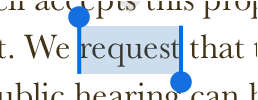
Select a range of text: Double-tap a word, then move the selection handles to include more or less text. Drag beyond the end of the paragraph to include any formatting marks (called invisibles).
Note: If you tap placeholder text, the entire block of text is selected.
Do one of the following:
Tap a line of text.
Double-tap a shape or text box to select a word within it.
Touch and hold within a line of text until a magnifying glass appears.
Drag your finger over the text until the insertion point is where you want it, then lift your finger.