
You can add your own paragraph styles, rename existing styles, and delete styles you don’t want to keep. Any changes you make to styles affect the current spreadsheet only, not all spreadsheets you create using Numbers.
Note: You can’t add, rename, or delete a paragraph style in a spreadsheet shared with others.
To add a new style, you first modify the text of a paragraph in your spreadsheet to look the way you want, then create the new style based on that text.
Select the text you want to base the new style on.
Click the Text tab at the top of the sidebar on the right.
If you don’t see a sidebar, or the sidebar doesn’t have a Text tab, click  in the toolbar.
Click the paragraph style name at the top of the sidebar, then click  at the top of the Paragraph Styles menu.
A new style with a placeholder name appears in the pop-up menu.
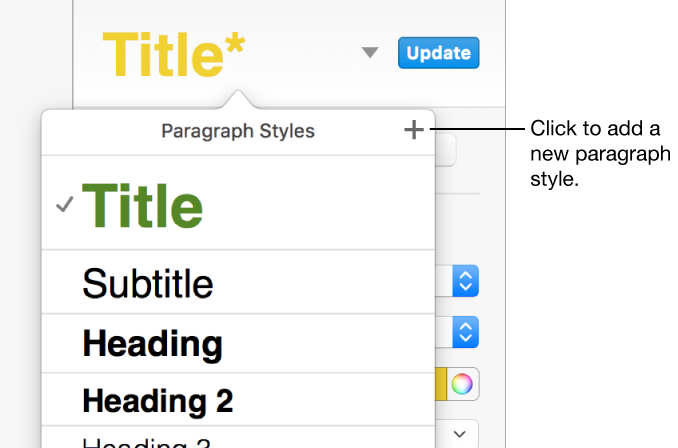
Type a name for the new style, then click outside the menu to close it.
Click a paragraph that uses the style you want to rename.
Click the Text tab at the top of the sidebar on the right, then click the paragraph style name at the top of the sidebar.
If you don’t see a sidebar, or the sidebar doesn’t have a Text tab, click in the toolbar.
In the Paragraph Styles pop-up menu, move the pointer over the style name, then click the arrow that appears.
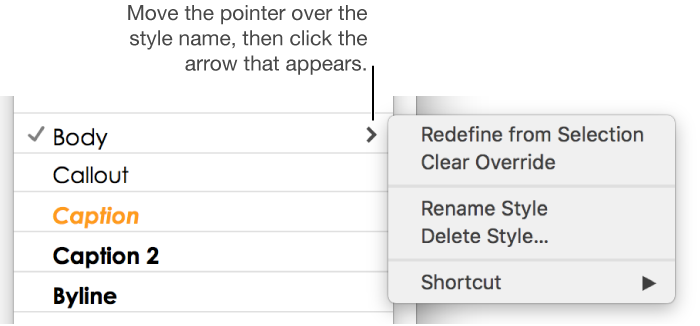
Choose Rename Style, then enter a new name.
You can delete a style from the Paragraph Styles list that isn’t being used in your spreadsheet. You might want to do this to simplify the pop-up menu to include just the styles you use most.
Click any text.
Click the Text tab at the top of the sidebar on the right, then click the paragraph style name at the top of the sidebar.
If you don’t see a sidebar, or the sidebar doesn’t have a Text tab, click in the toolbar.
In the Paragraph Styles pop-up menu, move the pointer over the name of the style you want to delete, then click the arrow that appears and choose Delete Style.
If you try to delete a style that’s being used, you are asked to choose a style to replace the one you’re deleting.