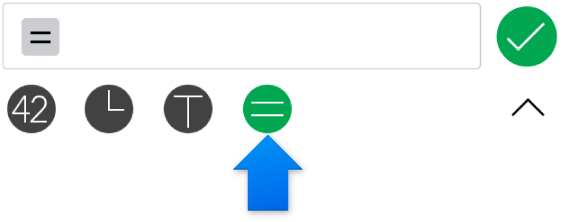
 below the input bar.
To perform mathematical calculations in your spreadsheet, use the formulas and functions keyboard. This keyboard allows you to enter numbers, operators, and constants to define a formula within a cell, or to access the hundreds of predefined functions available within Numbers.
The formulas and functions keyboard opens when you tap below the input bar.
There are two keyboards to accommodate all the keys you need, as shown below.
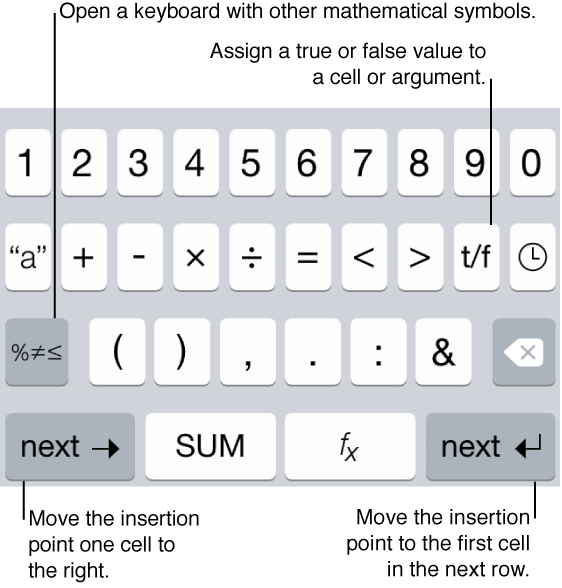
The SUM key in the keyboard automatically totals the values in all the cells that are above it in a spreadsheet.
 key: Opens the Function Browser, where you can find a predefined function and enter it into a cell.
 key: Opens the alphanumeric keyboard.
 key: Opens the date and time and duration keyboards, so that you can enter properly formatted data when it’s required in a formula or function.
 key: Switches between Boolean true and false values. If there’s a checkbox within a cell, the key switches between selecting and deselecting the checkbox.
 key: Deletes the last thing you typed.
 key: Moves the insertion point into the next cell to the right of the current cell.
 key: Moves the insertion point to the cell in the next row in the column of the last cell you tapped, so that you can continue to enter data into cells without having to dismiss the keyboard.
 key: Opens a keyboard displaying different mathematical symbols in the third row, as shown below:
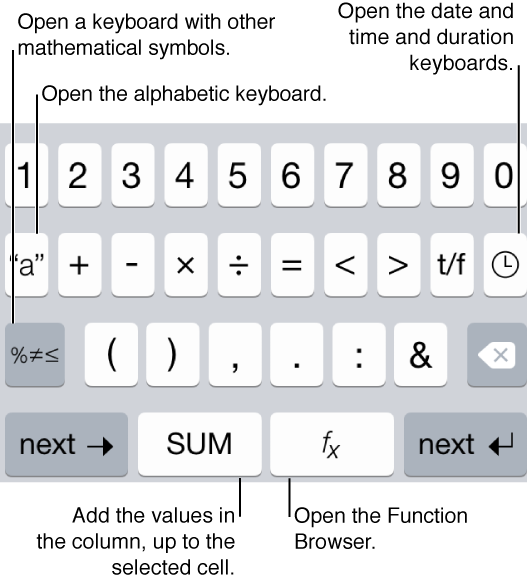
 key: Returns to the previous keyboard displaying different mathematical symbols in the third row.
To see detailed instructions on entering formulas and functions into cells, see Calculate values using data in table cells.