
You can set the timing display to show either the current playhead position or the total project duration. You can also set the timing display show this information in different units—frames or timecode.
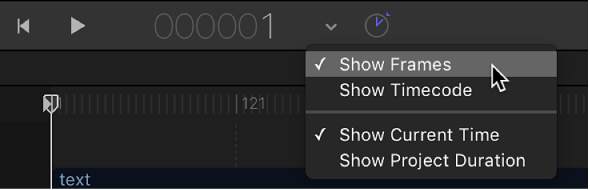
Do one of the following:
Click the clock icon on the right side of the timing display.
When set to project duration, the clock icon looks like this:

When set to playhead position (known as current time), the clock icon looks like this:

Click the down arrow on the right side of the timing display, then choose Show Current Time or Show Project Duration.
When set to show project duration, the timing display shows the running time or number of frames in your project (depending on the unit of measure you choose to display). When set to show the current time, the timing display shows the frame number or timecode number of the current playhead position (depending on the unit of measure you choose to display).
The timing display offers two ways of measuring time in your project: frames or timecode. Frames are incremental still images starting at 1 or 0 and continuing for the duration of your project. Timecode is the standard eight-digit numeric system used in video production. Timecode runs like a clock from 00:00:00:00 to 23:59:59:29. The first two digits represent hours; the second two digits represent minutes; the third two digits represent seconds; and the final two digits represent frames, as in HH:MM:SS:FF.
Click the down arrow on the right side of the timing display, then choose Show Frames or Show Timecode from the pop-up menu.
Frames and timecode counters have specific advantages, depending on the video format in which you’re originating and finishing. For example, if you’re designing a title sequence for a 35mm film that must be exactly 720 frames, set the timing display to show frames. If you’re building a television spot for broadcast (which uses the timecode standard), set the timing display to show timecode.