
The parameters in the Emitter Controls section of the Emitter Inspector determine how particles are distributed and rendered in your project.
Several of these controls are identical to those found in the Emitter HUD, with one difference: Although the emission control in the Emitter HUD lets you manipulate the Range, Angle, Latitude (3D), Longitude (3D), and Speed parameters using a single graphical control, the Emitter Inspector uses individual numeric controls for each parameter.
Note: The settings for emitters in the Properties Inspector and Emitter Inspector can be keyframed to change values over time. However, there’s no way to control the animation of individual particles.
Some parameters in the Emitter Inspector depend on the settings of other parameters. All combinations of parameters are described below:
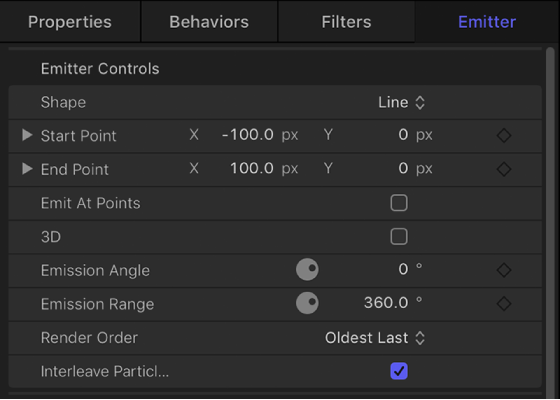
Shape: A pop-up menu to set the overall shape of the emitter. Different shapes significantly alter the distribution of generated particles. When you choose an emitter shape, different Emitter Inspector parameters appear that are unique to that shape. For example, when Rectangle is the selected shape, Outline, Tile Fill, and Random Fill become available in the Arrangement options.
The Shape pop-up menu contains the following items:
Point: The default shape for new emitters, specifies a single point of emission for a particle system.
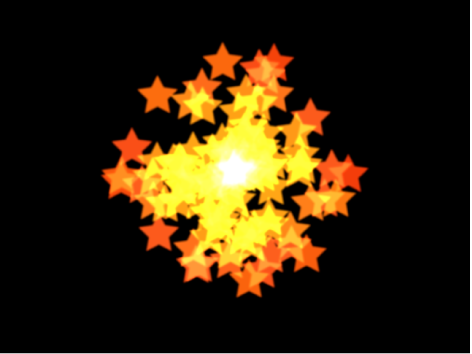
Line: Particles emerge from a line. Using the onscreen controls (with the Adjust Item tool selected in the canvas toolbar) or controls in the Properties Inspector, you can specify the length and location of the line. In the Inspector, you can set a specific number of points where particles emerge. This emitter shape is useful for creating sheets of particles that cascade over a wide area.

Rectangle: Particles emerge from a rectangle along its edge, or in a tile-fill or random-fill pattern. Using the onscreen controls (with the Adjust Item tool selected in the canvas toolbar), you can specify the size and location of the rectangle: Drag the corners to adjust width and height; drag edges to adjust width or height independently. Choose different rectangle patterns using the Arrangement parameter (described below). In the following image, the Arrangement parameter is set to Outline.

Use modifier keys to more precisely manipulate the corners of the Rectangle onscreen controls (with the Adjust Item tool selected in the canvas toolbar):
Option: Adjustments to size are scaled uniformly, with the anchor point remaining fixed.
Shift: Adjustments to size are made proportionally.
Circle: Particles emerge from a circle-shaped emitter. Depending on the setting you choose in the Arrangement parameter (described below) particles emerge in an outline, tile-fill, or random-fill pattern. Using the onscreen controls (with the Adjust Item tool selected in the canvas toolbar), you can specify the size and location of the circle. In the following image, the shape’s Arrangement parameter is set to Outline.
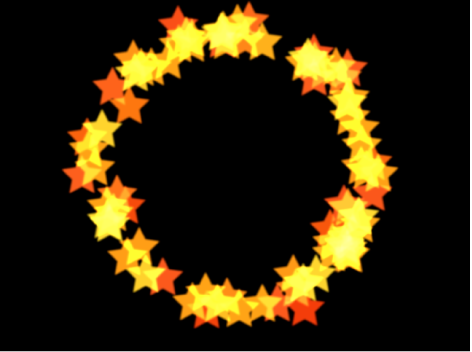
Burst: Particles emerge from a burst pattern. Using the onscreen controls (with the Adjust Item tool selected in the canvas toolbar), you can specify the size and location of the burst.
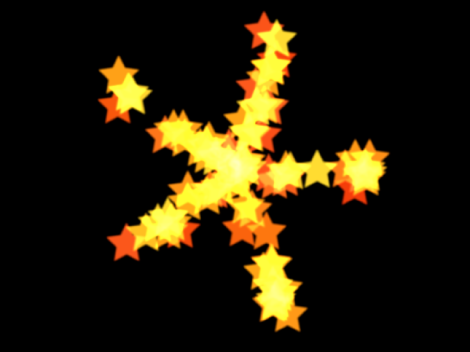
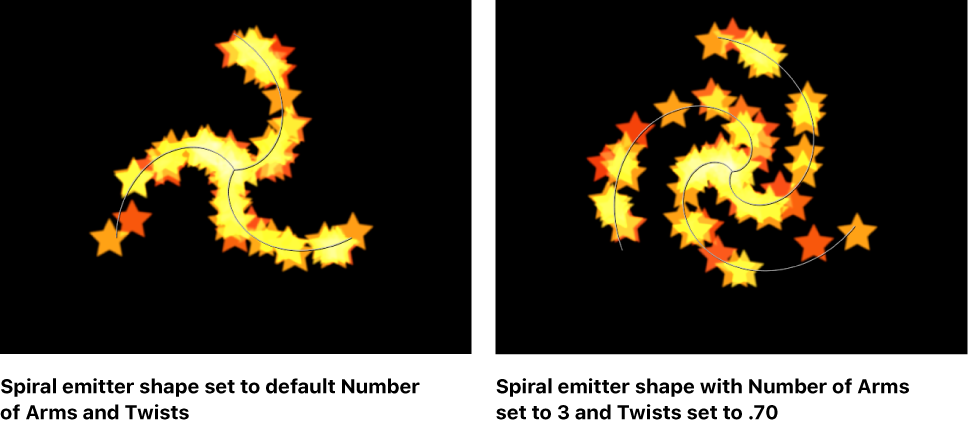
Spiral: Particles emerge from a spiral pattern. Using the onscreen controls (with the Adjust Item tool selected in the canvas toolbar), you can specify the size and location of the spiral.
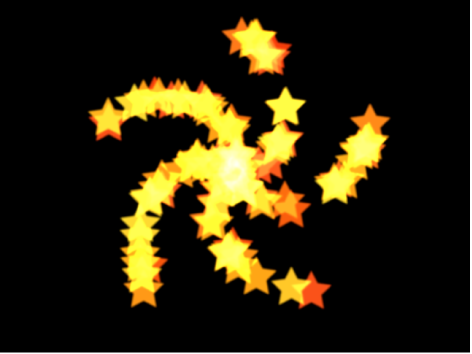
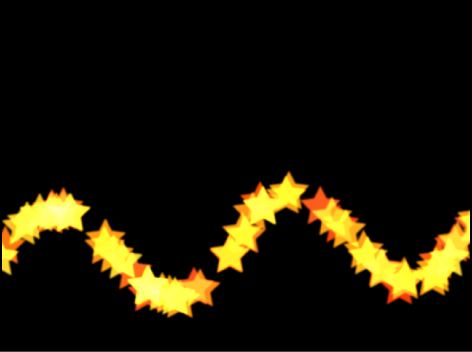
Wave: Particles emerge from a waveform. Using the onscreen controls (with the Adjust Item tool selected in the canvas toolbar) or the Start Point and End Point controls in the Emitter Inspector, you can specify the length and location of the wave.
Geometry: Particles emerge from the edge of a shape, defined by a spline object used as the shape source. The following image on the right shows the shape used as the emitter source. The image on the left shows particles emerging from the edge of the shape source.

To apply a shape as the geometry shape source for a particle emitter, drag the shape to the Shape Source well in the Emitter Inspector (when the Shape pop-up menu is set to Geometry).
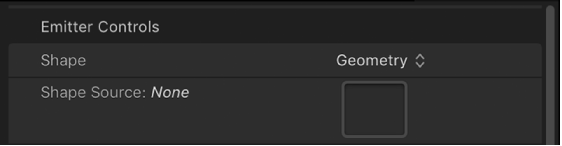
Image: Particles emerge from within an area defined by an image or from only the edges of the image. The image may or may not have an alpha channel. If it does, the shape of the alpha channel can also be used to define the emitter shape. The following image on the right shows the image used as the emitter image source; the image on the left shows the particles emerging from within the image.
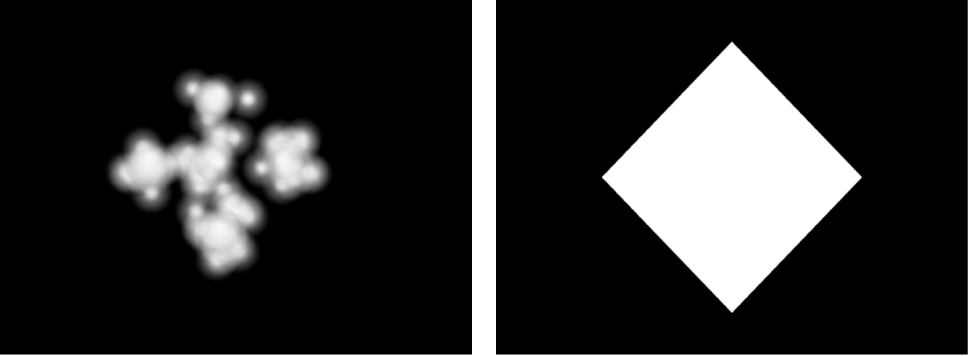
To apply an image as the image source for a particle emitter, drag the image to the Image Source well in the Emitter Inspector (when the Shape pop-up menu is set to Image).
Box: This option is available when the 3D checkbox (described below) is selected in the Emitter Inspector. Particles are emitted from a three-dimensional cube along its surface (Outline), or in a tile-fill or random-fill pattern (set in the Arrangement pop-up menu, described below). Using the onscreen controls (with the Adjust Item tool selected in the canvas toolbar), you can specify the size and location of the rectangle. Drag the front horizontal edge to adjust height; drag the front vertical edge to adjust width; drag a back edge to adjust depth; drag a front corner to adjust the width and height simultaneously. To reposition the emitter, drag inside the shape (but not on an edge or corner point). The following image shows a Box shape with Arrangement set to Tile Fill.
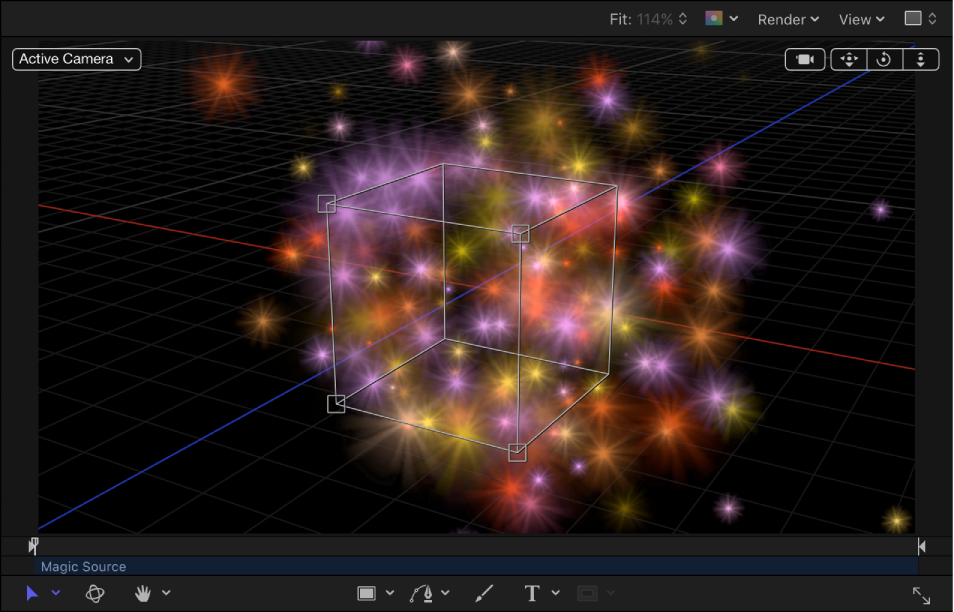
Sphere: This option is available when the 3D checkbox (described below) is selected in the Emitter Inspector. Particles are emitted from a three-dimensional sphere along its surface (Outline), or in a tile-fill or random-fill pattern (set in the Arrangement pop-up menu, described below). Using the onscreen controls (with the Adjust Item tool selected in the canvas toolbar), you can specify the radius and location of the sphere. Drag the outline of the sphere to adjust its radius; drag inside the sphere to reposition it in the canvas.
Arrangement: A pop-up menu (available when the Shape pop-up menu is set to Rectangle, Circle, Image, Box, or Sphere) to specify the pattern used to generate particles. There are three menu options:
Outline: Emits particles along the edge of the shape in 2D emitters and along the surface of the shape in 3D emitters.
Tile Fill: Emits particles from a tiled pattern of rows, columns, and ranks (for 3D emitters) in the circle, rectangle, image, box, or sphere. You can specify the number of columns, rows, and ranks, as well as the tile offset.
Random Fill: Emits particles randomly from within the circle, rectangle, image, box, or sphere.
Size/Radius: A slider (available when the Shape pop-up menu is set to Rectangle or Box) to set the size of the rectangle or cube from which particles are emitted. When Rectangle is the selected shape, the Width and Height controls become available. When Box is the selected shape, an additional Depth control becomes available. When Circle is the selected shape, this parameter becomes Radius.
Note: Height is measured in project pixels, and Width is measured in square pixels, to ensure that a numerically square shape will look square when Correct for Aspect Ratio is enabled in the View pop-up menu in the top-right corner of the canvas. For more information about square pixels, see Pixel aspect ratio.
Columns: A slider available when Shape is set to Rectangle, Circle, Image, Box, or Sphere, and Arrangement is set to Tile Fill. Sets the number of horizontal emitter points on a grid over the selected emitter shape. In the case of an irregular shape (nonrectangular), grid points that fall outside of the shape are ignored.
Rows: A slider available when Shape is set to Rectangle, Circle, Image, Box, or Sphere, and Arrangement is set to Tile Fill. Sets the number of vertical emitter points on a grid over the selected emitter shape. In the case of an irregular shape (nonrectangular), grid points that fall outside of the shape are ignored.
Ranks: A slider (available when Shape is set to Box or Sphere, and Arrangement is set to Tile Fill) to set the number of points in Z space on a grid over the selected shape from which particles are emitted.
Tile Offset: A slider available when Shape is set to Rectangle, Circle, Image, Box, or Sphere, and Arrangement is set to Tile Fill. Values from 0 to 100% offset the rows toward the right, and values from 0 to –100% offset the rows toward the left. A value of 50 or –50% creates a “brickwork” pattern.
Image Source: An image well (available when Shape is set to Image) to specify the object used to define the shape of the emitter.
Shape Source: An image well (available when Shape is set to Geometry) to specify a spline object used to define the shape of the emitter.
Emission Alpha Cutoff: A slider available when Shape is set to Image. When the Image Source object contains an alpha channel, this slider defines the minimum opacity value necessary to create particles at that point on the source image. For example, when Emission Alpha Cutoff is set to 25%, particles appear only where the alpha value of the image is equal to or greater than 25% opacity. The lower the Emission Alpha Cutoff value, the more particles appear. For this parameter to be effective, the alpha channel must have areas of varying transparency.
Start Point: Value sliders (available when the Shape pop-up menu is set to Line or Wave) to define, in X and Y coordinates, the first point of the line used as the emitter shape. Click the disclosure triangle to modify the Z position of the start point. You can adjust these values in the canvas using the onscreen controls (with the Adjust Item tool selected in the canvas toolbar).
End Point: Value sliders (available when Shape is set to Line or Wave) to define, in X and Y coordinates, the second point of the line used as the emitter shape. Click the disclosure triangle to modify the Z position of the start point. You can adjust these values in the canvas using the onscreen controls (with the Adjust Item tool selected in the canvas toolbar).
Emit At Points: A checkbox available when Shape is set to Line, Rectangle (with Arrangement set to Outline or Random), or Circle (with Arrangement set to Outline or Random), Burst, Spiral, Wave, Geometry, Box (with Arrangement set to Outline), or Sphere (with Arrangement set to Outline). When the Emit At Points checkbox is selected, particles emerge from a limited number of points (as defined in the Points parameter, described below). When the checkbox is deselected, particles may emerge from anywhere on the line or edge. When the Adjust Item tool is selected in the canvas toolbar, the points are visible in the canvas.
Points/Points Per Arm: A slider available when the Emit At Points checkbox is selected and Shape is set to any of the following: Line, Rectangle, Image, or Circle (with Arrangement set to Outline or Random Fill); or Burst, Spiral, Wave, or Geometry. Defines the number of points where particles are emitted. For Rectangle or Circle shapes, the particles are emitted from evenly distributed points along the edge of the shape when Arrangement is set to Outline. When the Adjust Item tool is selected in the canvas toolbar, the points are visible in the canvas.
Using a large number of points may slow your computer’s processing performance.
Radius: A slider (available when Shape is set to Circle, Burst, Spiral, or Sphere) to define the size of the shape from which particles are emitted.
Twists: A slider (available when Shape is set to Spiral) to set the number of turns in the spiral. The default value is 0.25.
Number of Arms: A slider (available when Shape is set to Burst or Spiral) to set the number of branches from which particles are emitted. The default value is 3.
Amplitude: A slider (available when Shape is set to Wave) to define half the distance from the highest point to the lowest point in the wave. Higher values result in more extreme waves.
Frequency: A slider (available when Shape is set to Wave) to set the number of waves. Higher values result in more waves.
Phase: A dial (available when Shape is set to Wave) to set the degree of the offset of the waves from the start and end points of the path. When set to 0 degrees (default), the wave begins and ends at half the distance from the highest point to the lowest point in the wave. When set to 90 degrees, the wave begins and ends at the highest point in the wave. When set to -90 degrees, the wave begins at the lowest point in the wave. When set to 180 degrees, the waves are the same as they are at 0 degrees, but inverted.
Damping: A slider (available when Shape is set to Wave) to set the direction of progressive diminishment of the oscillation of the wave. Positive damping values diminish the wave forward (from left to right); negative values diminish the wave backward (from right to left).
Offset: A slider available when Shape is set to Line, Rectangle (with Arrangement set to Outline), Circle (with Arrangement set to Outline), Burst, Spiral, Wave, Geometry, or Image. Offsets the emitter itself or the particles generated on the shape. For example, when the emitter Shape is a Line, changing the Offset value moves the emitter’s position in the canvas. When the emitter Shape is a Rectangle and Arrangement is set to Outline, changing the Offset value moves the particles along the edge of the shape.
3D: A checkbox that, when selected, enables the Box and Sphere options in the Shape pop-up menu. Further, because all emitter shapes can be manipulated in 3D space, additional 3D parameters are available for all emitter shapes when the 3D checkbox is selected: Render Particles, Emission Latitude, and Emission Longitude. These additional parameters appear in the Emitter Inspector and HUD.
Note: When the 3D checkbox is selected, particles cannot receive reflections, and the Reflections parameter (in the Properties Inspector) is no longer available for the emitter. Additionally, when the 3D checkbox is selected, In Global 3D (Better) must be selected from the Render Particles pop-up menu for particles to cast shadows and to be affected by lights.
For more information on the additional 3D controls in the HUD, see Adjust a particle system in the Emitter HUD.
Emission Angle: A dial (available when the Shape pop-up menu is set to a 2D shape) to set the direction in which particles travel. This control works in conjunction with the Emission Range control (described below). It’s equivalent to one of the functions of the graphical emission control in the Emitter HUD.
Note: When using an emitter shape other than a Point, such as a Line, Circle, Rectangle, Spiral, Burst, or Wave, and with Arrangement set to Outline, setting the Emission Angle parameter to 180 degrees and the Emission Range parameter to 0 degrees restricts the emission of particles to the inside of the shape. Setting the Emission Angle parameter to 0 degrees and the Emission Range parameter to 0 degrees restricts the emission of the particles to the area outside the shape.
Emission Range: A dial to restrict the area around the center of each emission point where particles are generated, in the direction of the Emission Angle. It’s equivalent to one of the functions of the graphical emission control in the Emitter HUD.
Note: When using a Line, Circle, Rectangle, Spiral, Burst, or Wave (but not Geometry) shape, setting Emission Range to 0 degrees keeps particles perpendicular to the emitter when they emerge.
Render Particles: A pop-up menu (available when the 3D checkbox is selected) to select between two rendering methods for the particles:
In Local 3D (Faster): The default setting, renders particles faster but does not allow for intersections with layers in the emitter group or with layers in other groups. Nor does it allow particles to cast shadows.
In Global 3D (Better): Allows the particles to intersect with layers in the emitter group and with layers in other groups. When turned on, your project’s playback performance is slowed.
Important: For the 3D particles to cast shadows, and be affected by lights and depth-of-field settings, you must select the 3D checkbox and choose In Global 3D (Better) from the Render Particles pop-up menu.
Emission Latitude: A dial (available when the 3D checkbox is selected) to set the emission direction (in degrees latitude) of the particles.
Emission Longitude: A dial (available when the 3D checkbox is selected) to set the axis of rotation (in degrees longitude) from which the particles are emitted.
Depth Ordered: A checkbox (available when the 3D checkbox is selected) that, when deselected, causes particle distribution to be completely random, regardless of size. Consequently, particle arrangements may appear to violate the rules of perspective.
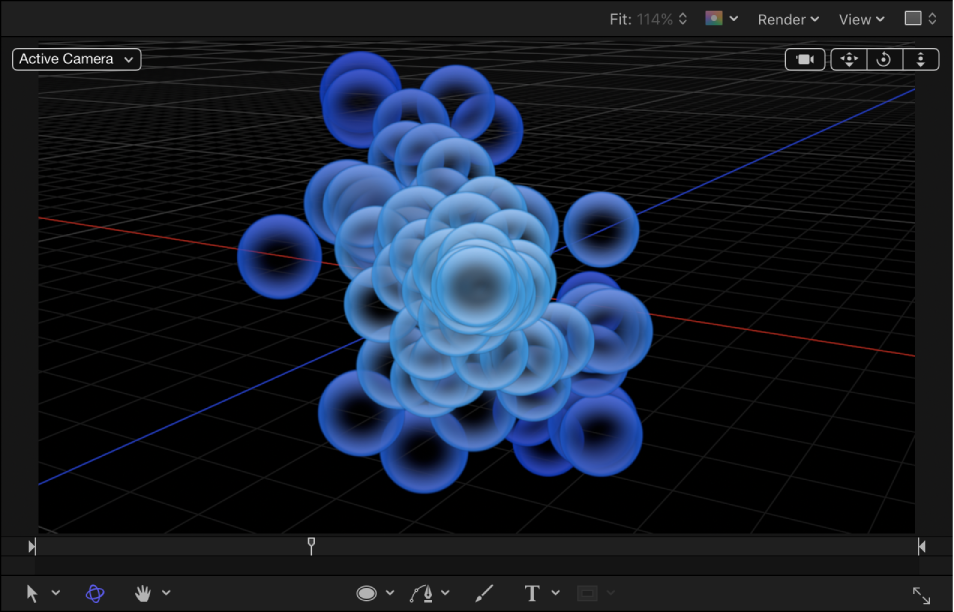
When selected, this checkbox draws the particles in the particle system according to each particle’s actual 3D position in the project. In other words, particles closer to the camera appear larger; particles farther from the camera appear smaller.
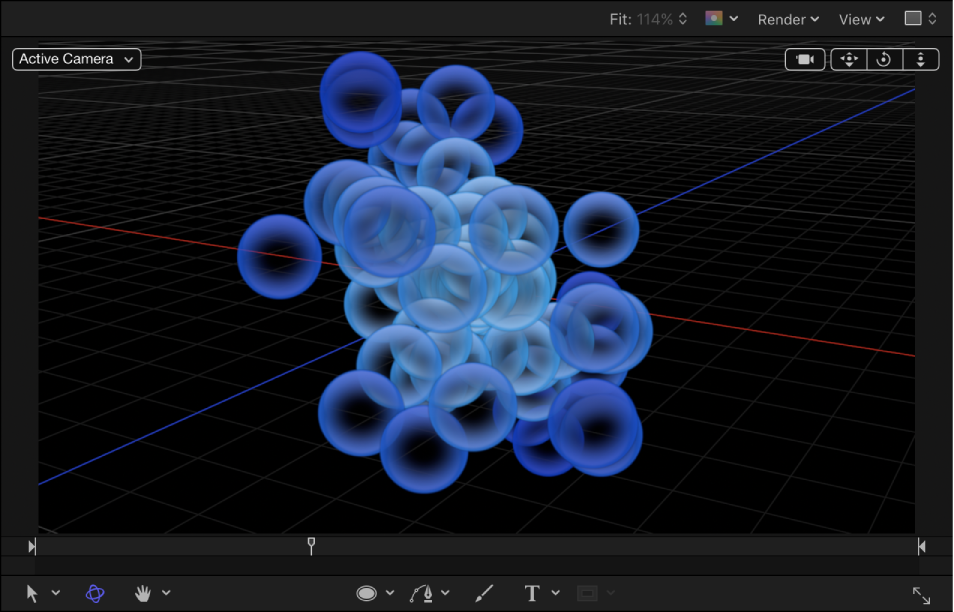
Render Order: A pop-up menu to set whether new particles are drawn on top of or underneath particles that have already been generated. There are two options:
Oldest First: New particles appear on top of older particles.
Oldest Last: New particles appear underneath older particles.
Interleave Particles: A checkbox that, when selected, mixes together particles generated from multiple cells. Deselecting this checkbox layers particles in the same order as the cells that generate them.
Note: This option has no effect with particle systems containing only one cell. Leaving this option off speeds rendering with multiple cells.
Face Camera: A checkbox (available when 3D is enabled) that forces the particle system to face the active scene camera. For more information on cameras, see Add a camera.