
In each row of the Layers list, icons offer additional information about groups, layers, and effects objects. Clicking these icons modifies or turns effects, visibility, and locking on or off.
The Layers list contains the following controls:
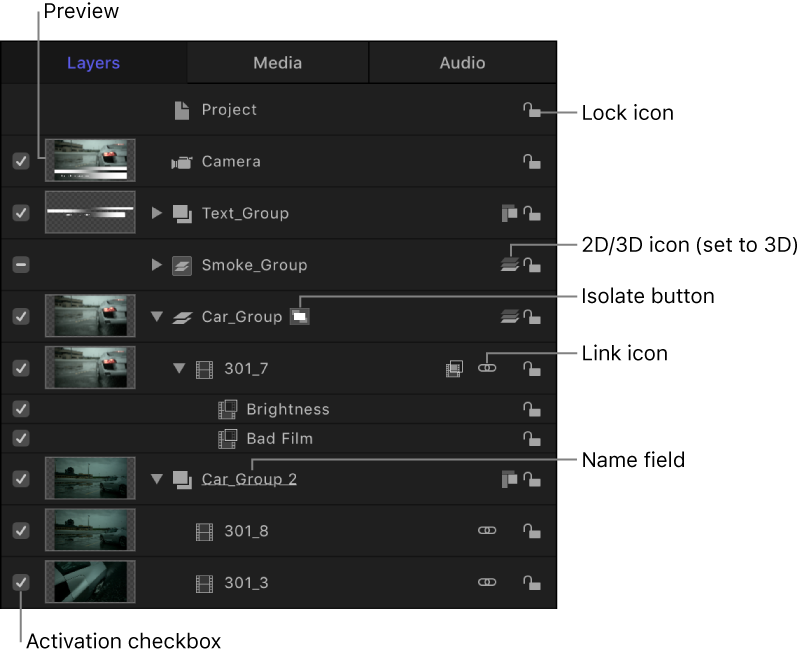
Activation checkbox: Turns the visibility of the group, layer, or effects object on or off. When an object’s visibility is off, you can still modify the object’s parameters and manipulate its onscreen controls (in the canvas).
Preview: Displays a thumbnail of a layer or group. The group thumbnail represents the cumulative result of the composite up to that point in the project. (You can turn the display of the preview on or off in the Layers Columns section of the View menu.)
Name field: Identifies the object by name. To edit the name, double-click the text area of a selected object, enter a new name, then press Return. In projects containing a camera, the Isolate button appears in the Name column.
Isolate button: Appears for a selected layer, group, or camera object in a project that contains a camera. (For information about cameras, see Add a camera.) The Isolate button has an active and inactive state. Clicking the Isolate button for a layer or group sets that object to its original face-forward orientation (so you can apply a mask, for example). Clicking the button again returns to the previous view. Clicking the Isolate button for a camera takes you to that camera’s view.
Note: When a group or layer is isolated, the name of the item replaces the current camera listing in the Camera menu (in the upper-left corner of the canvas).
Link icon: Appears when the layer has a corresponding audio element, such as a multichannel QuickTime file. To unlink the video and audio (to edit them separately), click the link icon. When they’re unlinked, a red slash appears through the icon.
2D/3D icon: Switches a group between 2D or 3D mode. The same icon appears to the left of the group name and indicates the 2D/3D status of the group. Layers cannot be 2D or 3D—they are always 2D elements in a 2D or 3D group.
Lock icon: Locks an object to prevent changes from affecting that object. Locking a group prevents changes to layers and effects in that group. When the lock is disabled, its icon appears open.
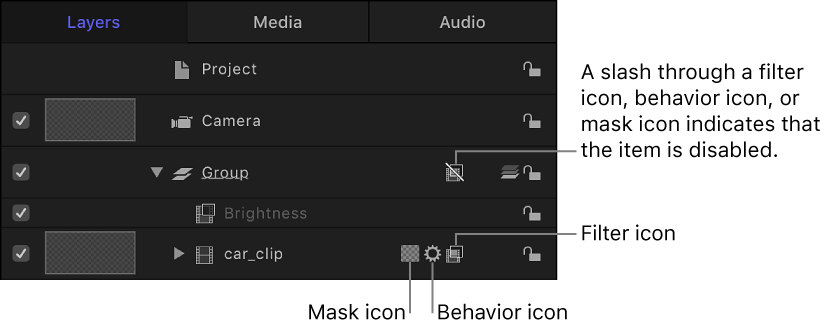
Mask, behavior, and filter icons: Appear when a mask, behavior, or filter is applied to the layer or group. To turn off the effect of the mask, behavior, or filter, click the icon so that it’s marked with a slash.
Opacity slider: Displays the opacity (transparency) of the group or layer. You can adjust the slider to change the item’s opacity. This slider is not displayed by default. To display the Opacity slider in the Layers list, choose View > Layers Columns > Opacity.
Blend Mode pop-up menu: Displays the blend mode of the layer or group. Click the pop-up menu to choose a blend mode. This pop-up menu is not displayed by default. To display the Blend Mode pop-up menu in the Layers list, choose View > Layers Columns > Blend Modes. For more information on blend modes, see How do blend modes work?