
Use the Outline controls in the Appearance pane of the Text Inspector to create text outlines. You can change the fill of the outline, as well as its opacity, softness, width, and layer order.
The Outline controls are not available for 3D text.
Note: You can distort text outlines independently of other Appearance parameters. For more information, see Spatially distort a glyph using onscreen controls.
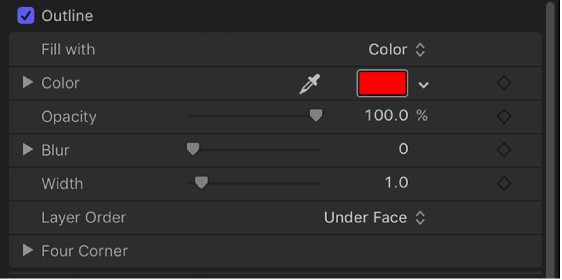
Outline: An activation checkbox to enable or disable all Outline parameters. This checkbox is deselected by default.
Fill with: A pop-up menu to set the fill for the outline. As with the Face controls, you can set the outline fill to Color, Gradient, or Texture.
The Outline fill controls—Color, Gradient, and Texture—are equivalent to the Face controls. For information on using these controls, see Face controls in the Appearance pane.
Color/Gradient/Texture: Color controls to set the color, gradient, or texture of the text outline, depending on which item is selected in the “Fill with” pop-up menu. Click the disclosure triangle to adjust additional parameters.
Opacity: A slider to set the opacity of the text outline.
Blur: A slider to set the softness of the text outline.
Width: A slider to set the thickness of the text outline.
Layer Order: A pop-up menu to set whether the outline is drawn over or under the text face.
Four Corner: Click the disclosure triangle to reveal value sliders to control the position of the outline attribute:
Bottom Left: Offsets the text outline from the lower left of its original position.
Bottom Right: Offsets the text outline from the lower right of its original position.
Top Right: Offsets the text outline from the upper right of its original position.
Top Left: Offsets the text outline from the upper left of its original position.
Note: You can also adjust the Four Corner parameters using onscreen controls. See Transform glyph controls in the Text HUD.