
The Keyframe Editor comprises a list of parameters on the left, a multifunctional graph on the right where keyframes and curves for each parameter are displayed, and tools for modifying keyframes and curves. These elements are described below:
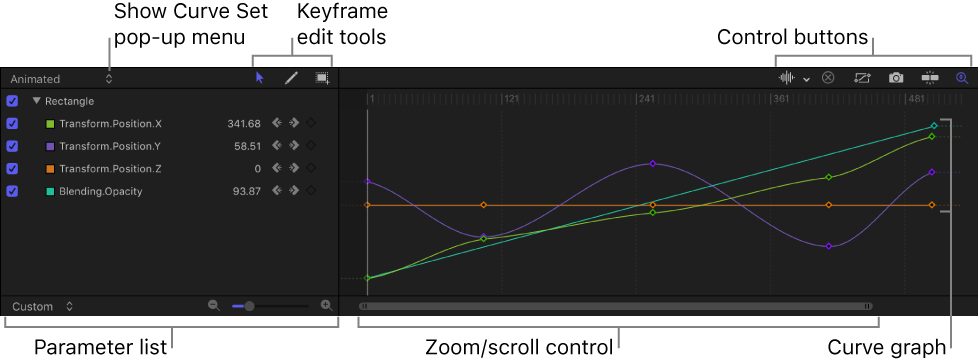
Show Curve Set pop-up menu: Choose an item from the menu to filter the parameters shown in the Keyframe Editor. For more information, see Choose a curve view.
Keyframe editing tools: Select any of three tools for editing keyframes and curves in the graph:
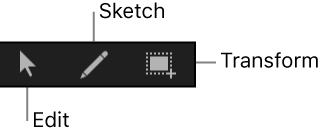
Edit Keyframes tool: Select and edit keyframes the same way you edit Bezier curves.
Sketch Keyframes tool: Manually draw curves that generate keyframes conforming to the shape drawn.
Transform Keyframes tool: Drag a selection box to enclose and manipulate a group of keyframes simultaneously.
For more information about using these tools, see Modify keyframes.
Parameter list: View keyframeable parameters of selected objects, including image layers, filters, and behaviors. When you select multiple objects in the Layers list or Timeline, you can compare their parameters here. The parameter list contains the following items:
Activation checkbox: Checkboxes in the left column set which parameters are displayed in the graph. Deselect a checkbox to hide a parameter’s keyframes and curves from the graph on the right.
Parameter name: Object and parameter names appear in the second column of the parameter list. Control-click a parameter name to apply a Parameter behavior from the shortcut menu.
Value: Parameter values at the playhead position appear in the third column. Modify a parameter value by dragging left or right over the number in this field. Or double-click the field, then enter a new value. The value displayed and editing options depend on several factors: If the playhead is on a keyframe, this field shows the value for that keyframe, and adjusting the value alters the keyframe. If the playhead is not on a keyframe, this field shows the value of that parameter at the current frame. If the parameter has keyframes, adjusting the value creates a new keyframe at that frame. (For more information on changing the values of keyframes, see Modify keyframes.)
Keyframe and keyframe navigation buttons: Keyframe controls appear in the fourth column. These controls are identical to those found in the Inspector: the Previous Keyframe button, Add/Delete Keyframe button, and Next Keyframe button. See Animate parameters in the Inspector.
Animation menu: The Animation menu appears for each parameter in the list. To open this menu, position the pointer over the far-right side of a parameter row, then click the down arrow that appears. The Animation menu in the Keyframe Editor contains all commands found in the Inspector’s Animation menu, plus several additional commands:
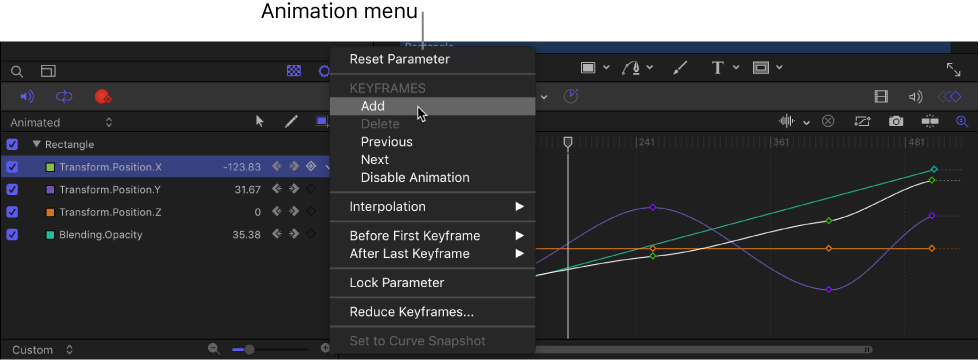
Reset Parameter: Removes keyframes and settings for the parameter, restoring the default value.
Add: Adds a keyframe at the current frame in the Keyframe Editor. If the playhead is positioned on a frame where a keyframe has been added, this command is unavailable. (Alternatively, you can use a keyboard shortcut—Control-K—to add a keyframe.)
Delete: Deletes the current keyframe. This command is available if the playhead is positioned on a frame where a keyframe exists.
Previous: Moves the playhead to the previous keyframe for this parameter. This command is available if a keyframe exists earlier in the project.
Next: Moves the playhead to the next keyframe for this parameter. This command is available if a keyframe exists later in the project.
Enable/Disable Animation: Activates or deactivates the keyframed value. Choosing Disable Animation hides the keyframes you set, restoring the parameter to its default value. However, the keyframes are not thrown away. Choosing Enable Animation returns the parameter to its last keyframed state.
Interpolation: Sets the type of curve for the parameter. See Curve interpolation methods for examples of the different interpolation methods. Choose Constant, Linear, Bezier, Continuous, Exponential, or Logarithmic. Exponential and Logarithmic are only visible from the Interpolation submenu when you Control-click a keyframe in the curve editor.
Before First Keyframe: Defines what happens between the first keyframe and the beginning of the clip. See Set curve extrapolation for examples of extrapolation methods. Choose Constant, Linear, Ping-Pong, Repeat, or Progressive. You can also turn the extrapolation into keyframes by choosing Generate Keyframes.
After Last Keyframe: Defines what happens between the last keyframe and the end of the clip. See Set curve extrapolation for examples of extrapolation methods. Choose Constant, Linear, Ping-Pong, Repeat, or Progressive. You can also turn the extrapolation into keyframes by choosing Generate Keyframes.
Lock/Unlock Parameter: Locks the parameter from changes. When a parameter is locked, neither keyframes nor curves are adjustable.
Reduce Keyframes: Opens the Reduce Keyframes dialog, which lets you apply a thinning algorithm to the keyframes for the parameter. This reduces the number of keyframes in a parameter while preserving the shape of the curve. The thinning algorithm can be adjusted in two ways: Increasing the Maximum Error Tolerance results in fewer keyframes; increasing the Smoothing Factor makes smoother curves between keyframe values.
Set to Curve Snapshot: Reverts keyframe changes made in the selected curve to the most recent snapshot. This command is available when Take/Show Curve Snapshot is turned on (the camera button in the upper-right corner of the Keyframe Editor). For more information, see Compare a modified curve to its previous state.
Graph area: Shows the keyframes and curves of active parameters (those in the parameters list). Each curve is a different color, although some colors are duplicated. Areas before the first keyframe and after the last keyframe are represented by dotted lines. Selected parameters and keyframes appear white.
A time ruler shows the locations of keyframes, project markers, playback In and Out points, and the playhead. Zoom controls at the bottom of the graph let you focus on specific regions of the sequence. For more information on using the zoom/scroll controls, see Customize the Timeline.
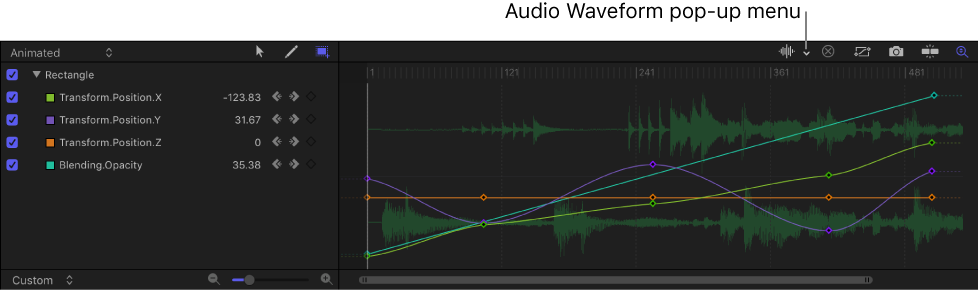
Audio Waveform pop-up menu: Turns on the display of audio waveforms for the selected item in the background of the graph. This lets you line up an effect to take place at the same time as an event that occurs in the audio. If there are multiple audio tracks in the project, you can use this menu to view the waveform of any individual audio track in the project, or the master track.
Clear Curve List button: Deletes all items in the parameter list from a custom set.
Fit Visible Curves in Window button: Scales the graph area vertically and horizontally so that the curve is entirely visible. This button does not change the value of your keyframes.
Take/Show Curve Snapshot button: Turns on and turns off the state of all curves in the Keyframe Editor. With a snapshot turned on, the original unaltered curve is represented by a lighter color—visible in the background behind the curves you’re adjusting—and can be used as a reference showing the curve’s original values. As long as you remain in the Keyframe Editor editing the current set of curves, the snapshot curve remains available. Clicking this button again causes the current snapshot to disappear. For more information about curve snapshots, see Compare a modified curve to its previous state.
Snapping button: Enables snapping. When this control is enabled, keyframes snap to markers, other keyframes, and other snappable items.
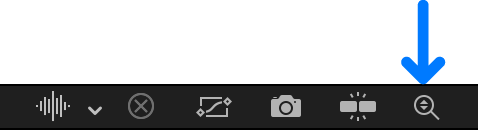
Auto-Scale Vertically to Fit Curves button: Rescales the graph vertically so that the curve is entirely visible. This does not change the value of your keyframes.
Tip: You can show the Keyframe Editor on a second display, providing a larger workspace for modifying keyframes and curves. For more information, see View the canvas or Timing pane on a second display.