
The Animation menu in the Inspector provides access to additional keyframing options.
Every keyframeable parameter in the Inspector has an Animation menu, available by Control-clicking a parameter’s name to reveal a shortcut menu, or by moving the pointer to the right side of a parameter row in the Inspector, then clicking the down arrow that appears.
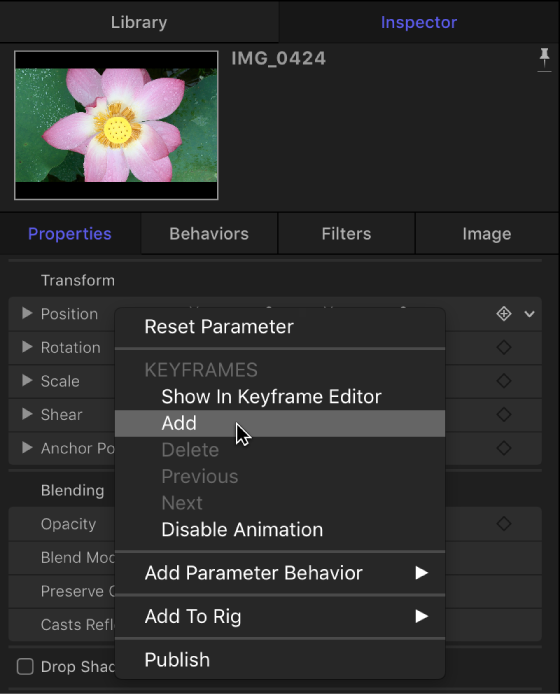
Note: If the Animation menu corresponds to a parameter that cannot be animated, the Keyframes menu items are dimmed.
The Animation menu contains the following items:
Reset Parameter: Removes keyframes and settings for this parameter, resetting the parameter to its default value.
Show in Keyframe Editor: Opens the Keyframe Editor and displays the parameter’s keyframes and curves. For more information, see Display the Keyframe Editor.
Add: Adds a keyframe at the current frame in the project. If the playhead is positioned on a frame where a keyframe has been added, this menu command is dimmed. To add a keyframe without accessing the Animation menu in the Inspector, press Control-K; doing so adds a keyframe to the last modified parameter of the object (regardless of the status of the Record button) at the current frame.
Delete: Deletes the keyframe. The Delete option is available only if the playhead is positioned on a frame where a keyframe exists.
Previous: Moves the playhead to the previous keyframe for this parameter. The Previous command is available only if a keyframe exists earlier in the project.
Next: Moves the playhead to the next keyframe for this parameter. The Next command is available only if a keyframe exists later in the project.
Note: You can also choose Mark > Go To > Previous Keyframe (or press Option-K) or Mark > Go To > Next Keyframe (or press Shift-K) to move from keyframe to keyframe.
Enable/Disable Animation: Activates or deactivates keyframes for the parameter. Choosing Disable Animation hides the keyframes already set, restoring the parameter to its default value. However, the keyframes are not thrown away. (A dash appears in the parameter row to indicate that the animation is disabled.) Choosing Enable Animation returns the parameter to its last keyframed state.
Add Parameter Behavior: Opens a submenu listing all available Parameter behaviors you can use to animate the parameter. For more information, see Add, remove, and disable a Parameter behavior.
Add To Rig: Lets you add a parameter to an existing rig, or to a new rig. Rigs are useful when you create templates for Final Cut Pro X. For more information, see Rigging overview and Final Cut Pro templates overview.
Publish: Sends the parameter control to Final Cut Pro X when you create and save a template for the editing application. The Publish command also lets you send rig controls (widgets) to Final Cut Pro. For more information on the Publish command, see Publish parameter controls to Final Cut Pro. For more information on rigging, see Rigging overview.