
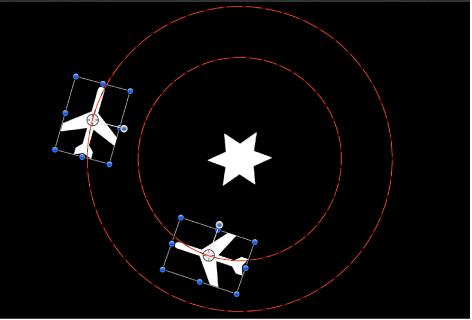
The Clamp behavior sets a minimum and maximum value for an animated parameter. In the following image, the center star has an applied Vortex behavior set to affect the two airplane shapes. As a result, the airplanes circle around the center star, as indicated by the red animation paths.
In the next image, a Clamp behavior is applied to the X Position parameter of the outer airplane shape. The Max value is set to 230 and the Min value is set to 0. As a result, the animation path is “clamped”—the image can travel 230 pixels to the right but cannot move left past the 0 point, creating a half-circle animation.
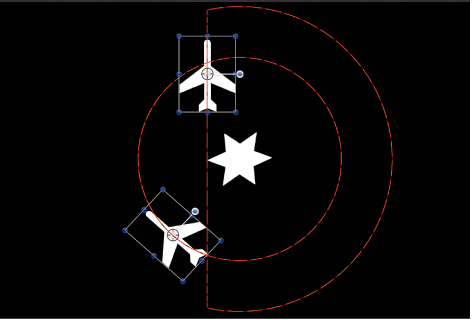
The circle motion path is essentially cut in half. If a negative value is entered in the Min value slider, the image moves past the 0 point.
Adjust this behavior using the controls in the Behaviors Inspector:
Clamp At: A pop-up menu that sets whether the behavior restricts clamping to a minimum value, a maximum value, or both minimum and maximum values.
Min: A value slider that lets you define the minimum amount of change for an animated parameter.
Max: A value slider that lets you define the maximum amount of change for an animated parameter.
The value is represented as a percentage, in pixels, or in degrees, depending on the parameter assignment. For example, if Clamp is applied to the Rotation parameter, the Min and Max values are degrees. If Clamp is applied to the X Position parameter, the values are in pixels.
Apply To: A pop-up menu that shows the parameter affected, and that can be used to reassign the behavior to another parameter.