
The Align to Motion behavior changes the rotation of an object to match changes made to its direction along an animation path. This behavior is meant to be combined with Simulation behaviors that animate the position of an object or with a keyframed animation path you create yourself.
Note: The Align to Motion behavior does not work on objects animated using the Motion Path behavior. Instead, use the Snap Alignment to Motion behavior (in the Basic Motion subcategory).
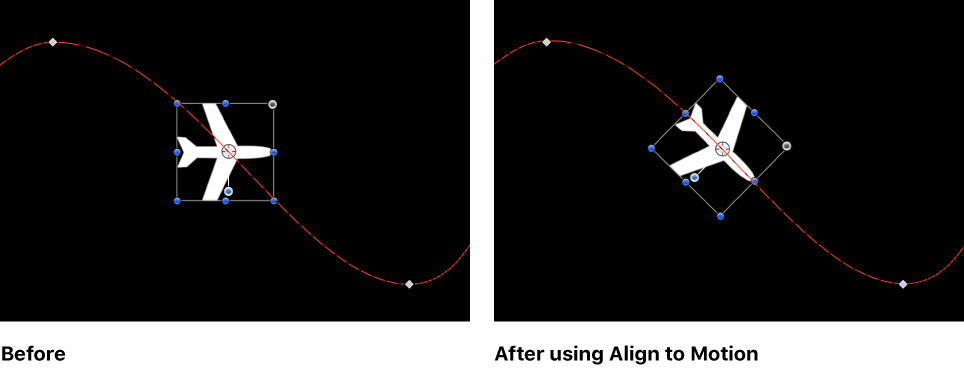
Unlike the Snap Alignment to Motion behavior, which produces absolute changes in rotation that precisely match changes in direction, Align to Motion has a springy reaction and creates a more lively effect.
In the above example, the airplane travels along the keyframed animation path, but the plane isn’t aligned to the animation path (notice the rotation handle). Using the Align to Motion behavior, the airplane’s angle of rotation moves so it points in the direction of the animation path. By adjusting the Drag parameter, you can make the object careen wildly about its anchor point as it goes around curves in the animation path.
Adjust this behavior using the controls in the Behaviors Inspector:
Affect Subobjects: A checkbox, available when this behavior is applied to an object that contains multiple child objects, such as a group, a particle emitter, a replicator, or a text layer. When this checkbox is selected, all objects enclosed in the parent object are affected individually. When this checkbox is deselected, all objects enclosed in the parent object are affected by the behavior together.
Rotation Axis: A pop-up menu that rotates the object around the X, Y, or Z axis. You can also select All to rotate the object around all three axes. The default rotation axis is Z.
Axis: A pop-up menu that sets whether the object aligns to its horizontal or vertical axis.
Invert Axis: A checkbox that flips the orientation with which the object aligns to the motion.
Spring Tension: A slider that adjusts how quickly the object’s rotation changes to match a change in the object’s direction. Lower values create a delay between a change to an object’s position and its subsequent change in rotation. Higher values create more responsive changes in rotation.
Drag: A slider that adjusts whether the change in rotation made by this behavior overshoots the new direction of the object. Low drag values result in springy changes in rotation, where the object rotates back and forth as it overshoots changes in direction. High drag values dampen this effect, making the object’s rotation stick more closely to the changes made in rotation. Higher values also cause the object’s rotation to lag behind the object’s change in position.