
The Gravity behavior causes an object, or the objects in a group (when Affect Subobjects is selected), to fall over time. The gravitational acceleration can be increased or decreased, resulting in a change to the rate of fall. Objects affected by the Gravity behavior continue to fall past the bottom edge of the canvas (unless the Edge Collision behavior has been applied).
The following illustration shows an object affected by the Throw, Snap Alignment to Motion, and Gravity behaviors all at once.
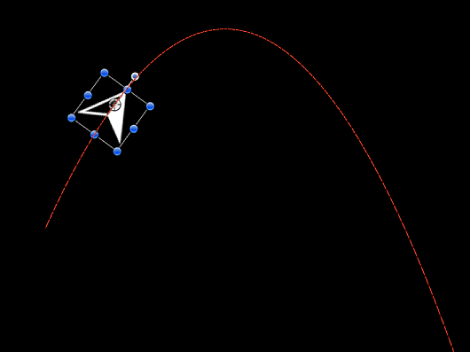
As you can see, the Gravity behavior can be used in conjunction with other behaviors that animate the position of objects to create natural-looking arcs and animation paths that simulate thrown objects falling to the ground. For example, apply the Throw behavior to an object to send it flying through the air, and then apply the Gravity behavior to it to make the object arc up and then fall down past the bottom of the canvas.
You can also set the Acceleration parameter to a negative value, effectively applying “antigravity” to the object and making it fly up.
Adjust this behavior using the controls in the Behaviors Inspector:
Affect Subobjects: A checkbox, available when this behavior is applied to an object that contains multiple objects, such as a group, a particle emitter, a replicator, or a text layer. When this checkbox is selected, all objects enclosed in the parent object are affected individually. When this checkbox is deselected, all objects enclosed in the parent object are affected by the behavior together.
Acceleration: A slider that sets the strength of gravity affecting the target object. The higher this value, the faster the target object falls.