
An object with the Attracted To behavior applied moves toward a single specified target, the object of attraction. Additional parameters allow you to adjust the area of influence that defines how close an object must be to move toward the object of attraction, and how strongly it is attracted.
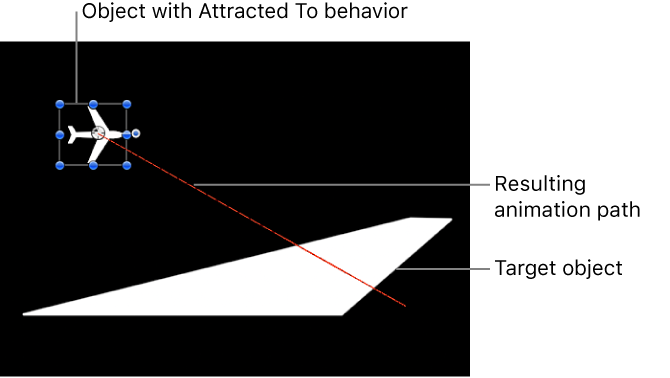
The Drag parameter lets you define whether attracted objects overshoot and bounce about the attracting object, or whether they eventually slow down and stop at the position of the target object.
You can apply two or more Attracted To behaviors to a single object, each with a different object of attraction, to create tug-of-war situations where the object bounces among all objects it’s attracted to.
Adjust this behavior using the controls in the Behaviors Inspector:
Affect Subobjects: A checkbox, available when this behavior is applied to an object that contains multiple child objects, such as a group, a particle emitter, a replicator, or a text layer. When this checkbox is selected, all objects enclosed in the parent object are affected individually. When this checkbox is deselected, all objects enclosed in the parent object are affected by the behavior together.
Object: An object well that defines the object of attraction. To set the defined target object, drag the object from the Layers list to the Object well in the Attracted To HUD or Inspector. In the Layers list, you can also drag the target object onto the Attracted To behavior.
Strength: A slider defining the speed at which the object moves toward the object of attraction. With a value of 0, the object doesn’t move at all. The higher the value, the faster the object moves.
Falloff Type: A pop-up menu that determines whether the distance defined by the Influence parameter falls off linearly or exponentially. There are two menu items:
Linear: Object attraction falls off in proportion to the object’s distance.
Exponential: The closer an object is within the area of influence, the more strongly it is attracted, and the faster it moves toward the object of attraction.
Falloff Rate: A slider that sets how quickly the force of attraction between objects affected by this behavior falls off. A low Falloff Rate value results in objects quickly getting up to speed as they move toward the object of attraction. A high Falloff Rate causes objects to accelerate much more slowly. When set to Exponential, the attraction falls off more quickly than when set to Linear.
Influence: A slider that defines the radius of the circle of influence, in pixels. Objects that fall within the area of influence move toward the object of attraction. Objects outside the area of influence remain in place.
Drag: A slider that reduces the distance attracted objects overshoot the object of attraction. Lower Drag values result in the object overshooting the object of attraction, moving past and then careening back around toward the target object again and again. Higher Drag values result in the object coming to rest sooner.
Include X, Y, and Z: Buttons that specify the axes on which the affected object (or objects) moves around the object to which it is attracted. When Z is enabled, the object moves about its attractor object in Z space.