
The Random Motion behavior animates the position of an object and makes that object move around the canvas along a random path. The Random Motion behavior is useful for creating varied animation paths for large numbers of objects you want to move at the same time. For example, you can create an arrangement of ten objects in the canvas and apply the Random Motion behavior to them all.
Although the motion created with this behavior appears to be random, it’s predetermined by the group of parameters you’ve chosen. As long as you don’t change the parameters, the animation path created by this behavior remains the same. If you don’t like the path that was randomly generated, click the Generate button in the HUD or in the Behaviors Inspector to pick a new random seed number. This number is used to generate a new path.
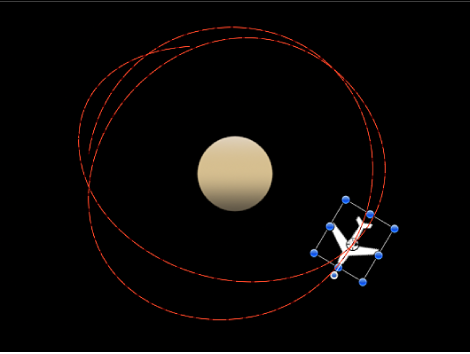
You can also use the Random Motion behavior to add variation to the animation paths created by other behaviors that affect an object’s position. In the following example, adding Random Motion to an object with the Orbit Around behavior results in a more erratic animation path from orbit to orbit, although it still moves around the center as before.
Adjust this behavior using the controls in the Behaviors Inspector:
Affect Subobjects: A checkbox that appears when this behavior is applied to an object that contains multiple objects, such as a group, a particle emitter, a replicator, or a text layer. When this checkbox is selected, all objects enclosed in the parent object are affected individually. When this checkbox is deselected, all objects enclosed in the parent object are affected by the behavior together.
Amount: A slider that determines the speed the object moves by changing the length of the animation path. Higher values result in faster motion and longer animation paths.
Frequency: A slider that determines the number of twists and turns in the animation path, which can be seen by the crookedness of the resulting animation path. Higher values create more turns in the animation path. Lower values result in straighter animation paths.
Noisiness: A slider that determines an additional level of jaggedness along the animation path shape defined by the Amount parameter. Higher values result in a more jagged-looking animation path.
Drag: A slider that controls the speed the object moves along the animation path. While the Amount parameter controls the length of the animation path, the Drag parameter shrinks or enlarges the animation path as a whole.
Include X, Y, and Z: Buttons that specify the space in which random motion is in effect. For example, when X and Y are enabled, the motion occurs in the XY plane; when Y and Z are enabled, the motion occurs in the YZ plane.
Random Seed: A button that picks a random seed number used to generate new animation paths, based on the values you’ve picked in the other parameters of this behavior.