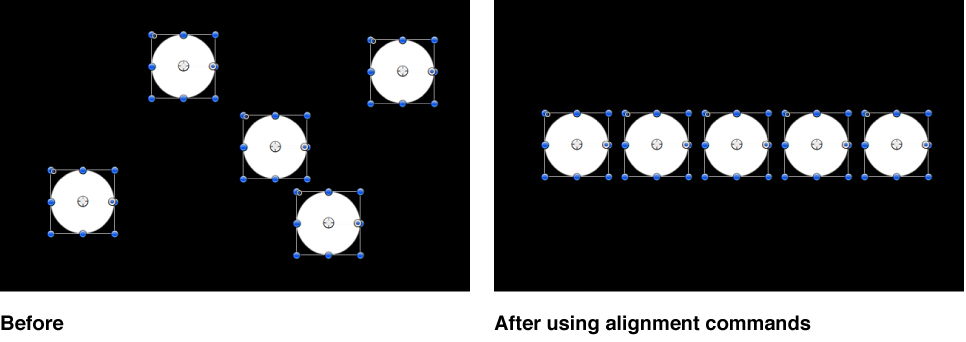

The Alignment submenu in the Object menu contains commands that let you reposition any number of simultaneously selected layers to align with one another in various ways. These commands make it easy to organize a jumble of layers into an even layout.
In each operation, the left, right, top, and bottom of the selected layers are defined by the bounding box that surrounds each layer. The position of the anchor point is ignored.
Select the layers or groups you want to align, choose Object > Alignment, then choose any of the following:
Align Left Edges: Layers are moved horizontally so their left edges line up with the leftmost layer in the selection.
Align Right Edges: Layers are moved horizontally so their right edges line up with the rightmost layer in the selection.
Align Top Edges: Layers are moved vertically so their tops line up with the topmost layer in the selection.
Align Bottom Edges: Layers are moved vertically so their bottoms line up with the bottommost layer in the selection.
Align Far Edges: Layers are moved in Z space so their far edges line up with the farthest layer in the selection.
Align Near Edges: Layers are moved in Z space so their near edges line up with the closest layer in the selection.
Align Horizontal Centers: Layers are moved horizontally so their centers line up along the center point between the leftmost and rightmost layers in the selection.
Align Vertical Centers: Layers are moved vertically so their centers line up along the center point between the topmost and bottommost layers in the selection.
Align Depth Centers: Layers are moved in Z space so their centers line up along the center point between the farthest and nearest layers in the selection.
Distribute Lefts: Layers are moved horizontally so the left sides of all layers are evenly distributed, from right to left, between the leftmost and rightmost layers in the selection.
Distribute Rights: Layers are moved horizontally so the right sides of all layers are evenly distributed, from right to left, between the leftmost and rightmost layers in the selection.
Distribute Tops: Layers are moved vertically so the tops of all layers are evenly distributed, from top to bottom, between the topmost and bottommost layers in the selection.
Distribute Bottoms: Layers are moved vertically so the bottoms of all layers are evenly distributed, from top to bottom, between the topmost and bottommost layers in the selection.
Distribute Far: Layers are moved in Z space so the far edges of all layers are evenly distributed along the Z axis, from closest to farthest, between the closest and farthest layers in the selection.
Distribute Near: Layers are moved in Z space so the near edges of all layers are evenly distributed along the Z axis, from closest to farthest, between the closest and farthest layers in the selection.
Distribute Horizontal Centers: Layers are moved horizontally so the centers of all layers are evenly distributed, from left to right, between the leftmost and rightmost layers in the selection.
Distribute Vertical Centers: Layers are moved vertically so the centers of all layers are evenly distributed, from top to bottom, between the topmost and bottommost layers in the selection.
Distribute Depth Centers: Layers are moved in Z space so the centers of all layers are evenly distributed, from closest to farthest, between the closest and farthest layers in the selection.
Each of the above commands affects the Position parameter of each layer.