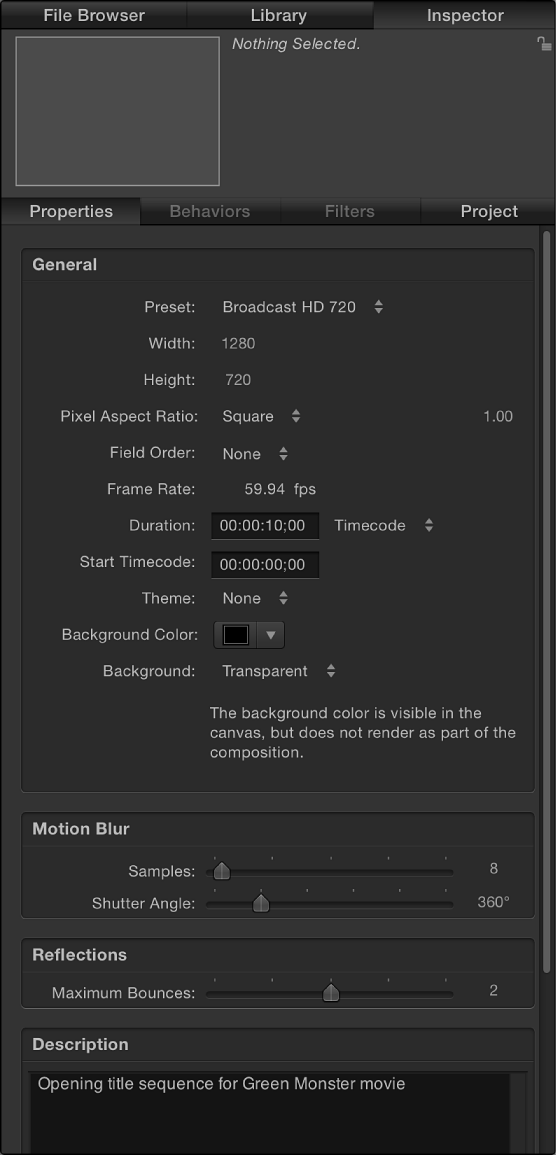

When the Project object is selected in the Layers list, the Properties Inspector is divided into several control groups: General, Motion Blur, Reflections, and Description.
General controls
Use the controls in the General group to set or modify your project’s basic attributes.
Preset: A pop-up menu to choose a common video format to base your preset on. After choosing a preset, you can adjust the other parameters in the Properties Inspector to customize your format settings. For more information about managing Motion project presets, see Create, edit, and delete project presets.
Width and Height: A value slider to define the size of the Canvas and the default output resolution of your project. Drag left or right over the values to decrease or increase them. Frame size is usually defined by the video format you plan on outputting to. For example, NTSC DV format video is 720 x 480, whereas PAL DV format video has a frame size of 720 x 576.
Pixel Aspect Ratio: A pop-up menu to set whether the project is created using square or nonsquare pixels. Computer displays, film, and high-definition video use square pixels, while standard-definition video uses nonsquare pixels. Choose Square for projects intended for the web, high-definition projects, and film, or choose a nonsquare pixel ratio corresponding to each international standard-definition broadcast format. A value slider to the right of this pop-up menu displays the numerical aspect ratio, in case you need to change the dimensions manually.
Field Order: A pop-up menu to set field order if the project uses interlaced video. Project field order should match the field order of the device being used to output the resulting QuickTime file to video. When working with progressive-scan video or film, choose None.
Frame Rate: A display field to see the project frame rate (in frames per second). Frame rate should match that of the format you output to. For example, film is 24 fps, PAL video is 25 fps, and NTSC video is 29.97 fps.
Important: Frame rates cannot be changed for existing projects.
Duration: A value field to modify the project’s Timeline duration. Use the adjacent pop-up menu to define the duration units (Frames, Timecode, or Seconds).
Override FCP: A checkbox (available only in Final Cut Transition projects) that, when selected, overrides the default transition duration (as defined in the Editing pane of Final Cut Pro Preferences). For more information, see Final Cut Pro templates overview.
Start Timecode: A value field to set the starting timecode displayed in the project.
Theme: A pop-up menu to assign a theme to the project.
Designed for 4K: A checkbox available only in Final Cut Effect, Transition, Generator, or Title template projects. For more information, see Set template resolution.
Background Color: A color control to set the background color of the Canvas.
Background: A pop-up menu to define whether the Background Color is rendered as part of the alpha channel. Regardless of the selection, the Background Color is visible in the Canvas. Choose from these three options:
Transparent: The background color does not render as part of the alpha channel.
Solid: The background color creates a solid alpha channel.
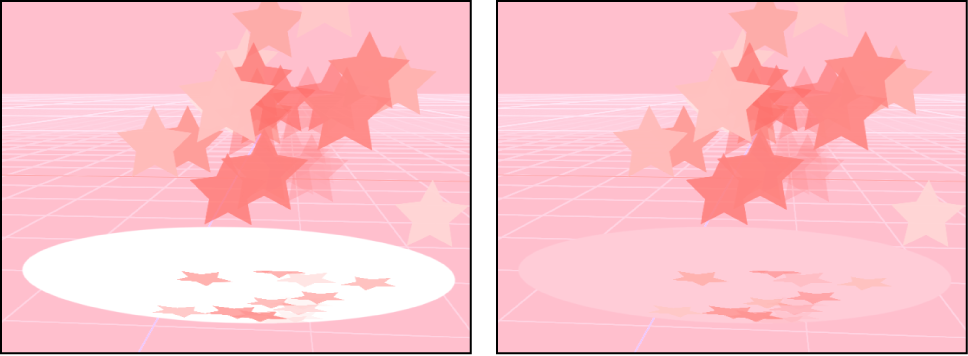
Environment: The background color creates a solid alpha channel and interacts with 3D projects, including blend modes and reflections. In the following images of the Canvas, Reflection is turned on for the elliptical shape (in the shape’s Properties Inspector). In the left image, the elliptical shape retains its original white color because Background is set to Solid. In the right image, the pink background is reflected in the elliptical shape because Background is set to Environment.
Motion Blur and Reflections controls
Below the General section of the Properties Inspector are two groups of controls that can affect how your project looks when exported: Motion Blur and Reflections.
The Motion Blur controls simulate the effect a camera’s mechanical shutter has on a frame of film or video when the camera or its subject is moving. In Motion, motion blur affects objects in your project that are animated using behaviors or keyframes, creating more natural-looking motion in your project, even though the animation is artificial. As with a camera, faster objects have more blur; slower objects have less blur.
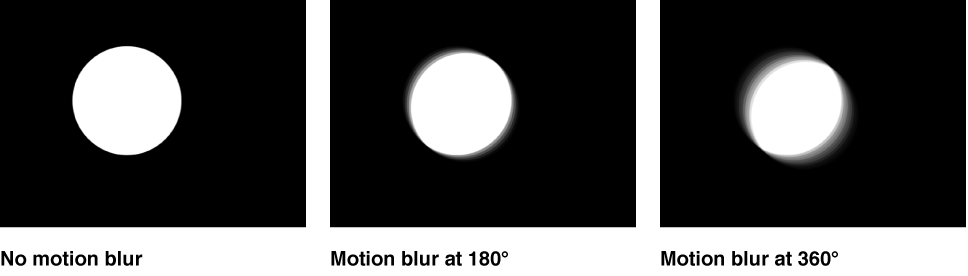
The Motion Blur section of the Properties Inspector has two settings:
Samples: A slider to set the number of subframes rendered per frame, where one frame represents 360 degrees. Higher Samples values result in a higher-quality motion-blur effect, but are more processor-intensive. The default Samples value is 8. The maximum possible value is 256.
Shutter Angle: A slider to define the size of the motion blur that appears for animated objects. Increasing the shutter angle increases the number of frames over which the shutter is open.
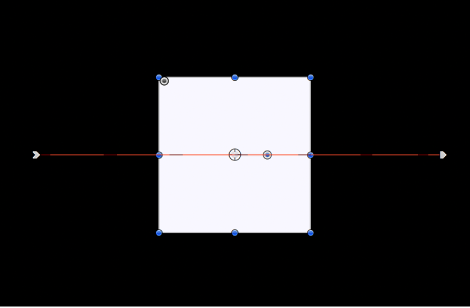
The following image shows a shape keyframed to move quickly across the Canvas horizontally.
In the next image, Motion Blur is enabled and Samples is set to the default value of 8.

Note: When using larger Shutter Angle values, it may be necessary to increase the Samples value to eliminate unwanted artifacts.
In the above image, the Shutter Angle is set to the default of 360 degrees, which represents 1 frame. In the following image, Shutter Angle is set to 600 degrees.

The Reflections section of the Properties Inspector has one parameter:
Maximum Bounces: A slider to limit the number of recursive reflections that can occur when two or more shiny objects reflect one another. This parameter is intended to prevent an endless repetition of reflective bounces.
For more information about reflections, see Cast a reflection.
Description field
At the bottom of the Properties Inspector is a field where you can enter a brief description of the project, including significant characteristics of the project preset, such as frame size and frame rate.