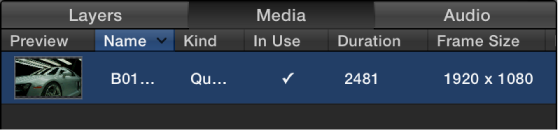
When you import an external media file into a Motion project, two things occur:
An instance of that media (an image or video clip) is placed in your project, and is visible in the Layers list, Canvas, and Timeline.
A link to the external source media file on your computer or other connected device is shown as an item in the Media list in the Project pane.
Media used in Motion must remain connected to the source media files on your computer or networked device. If you move, delete, or rename external media files that correspond to media used in a Motion project, the source media link (in the Media list) and any layers in your project using that source media go “offline.” It’s easy to reconnect offline media in your project (as long as the external files are still available on your computer or networked device). For more information, see Reconnect offline media files.
Because Motion is a nondestructive effects application, changes you make to media layers in your project are not applied to the external media on your computer or connected device. Rather, any changes you make to a media layer are applied to the instance of the media in Motion.
You can view information about source media in two places in the Motion workspace:
Media list: The second list in the project pane, itemizes all source media files (audio, image, image sequence, and QuickTime movie files) in your project. The items in this list are links to source media files that remain on your computer or networked device. Applied effects (such as filters or behaviors) and graphics content created in Motion (such as masks, shapes, or text) do not appear in the Media list. Columns in the Media list display information about each source file, including format, duration, frame rate, and so on. For more information, see Media list overview.
Media Inspector: Available when you select a media item the Media list, displays information about the selected source media file (format, duration, frame rate, and so on). The Media Inspector also contains adjustable media controls for modifying instances of the source media file used in your project. For more information, see Display the Media Inspector.