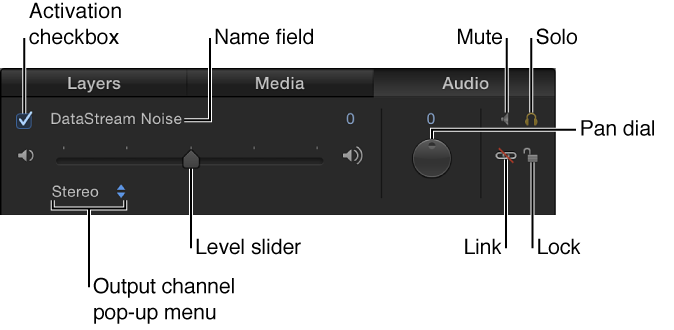

When you add an audio file to your project, Motion creates one or more audio tracks for the file. In the Audio list of the Project pane, you can turn audio tracks on and off, select tracks, mute and solo tracks, and control their volume and pan settings:
Important: Changes you make to an audio track, such as renaming or trimming it, do not affect the source audio file.
Do any of the following:
Select an audio track: In the Audio list or Timeline, click in the row containing the audio track’s name and controls. Selected tracks are highlighted. Shift-click to select multiple tracks.
Turn an audio track on or off: In the Audio list or Timeline, click the activation checkbox on the left side of the audio track row. Deselecting an audio track’s checkbox removes it from the audio mix.
Rename a track: In the Audio list or Timeline, double-click a track’s name, then enter a new name.
Adjust a track’s audio volume: In the Audio list, the track’s HUD, or the Audio Track Inspector, drag the Level slider. You can also change the parameter numerically in the Audio Track Inspector using the value slider to the right of the Level slider.
Pan a track, changing its position: In the Audio list, adjust the Pan dial, or, in the Audio Track Inspector or Audio Track HUD, drag the Pan slider.
Mute a track, temporarily silencing it during playback: In the Audio list, click the Mute button (the speaker icon). Muted audio tracks remain silent during playback, but are still part of the mix when you export your project. You can also mute tracks in the Audio Timeline by Control-clicking a track, then choosing Mute from the shortcut menu.
Solo a track, temporarily muting all other tracks: In the Audio list, click the Solo button (the headphones icon). Soloing an audio track mutes all other audio tracks during playback, soloing multiple audio tracks mutes all tracks not soloed during playback.
Unlink a track: In the Audio list, click the link icon. Unlinked audio can be moved independently of its accompanying video track in the Timeline. Click the link icon again to relink it to the same video track it was originally linked to. If you’ve offset its position in the Timeline, the offset is maintained when the audio track is linked again.
Lock a track, preventing it from being edited: In the Audio list, click the lock icon. Click the lock icon again to unlock the track. When a track is locked, you cannot mute or solo the track, change its level or pan, move or trim it, or add keyframes. You can still play the track, and turn it on or off.
Specify an output channel: In the Audio list, click the output channel pop-up menu, then choose an output channel for the audio track, such as Stereo, Left, Right, Center, and so on. You can also specify an output channel using the Output Bus pop-up menu in the Audio Track Inspector.