
Camera Type: A pop-up menu to set the type of camera used. There are two options:
Framing: Sets the camera origin at the focal plane. The focal plane of a camera is a plane located at a distance equal to the camera’s focal distance along its local Z axis (or line of sight) and oriented perpendicular to the camera’s local Z axis.
Viewpoint: Sets the camera origin at the center of projection, “inside” the virtual camera.
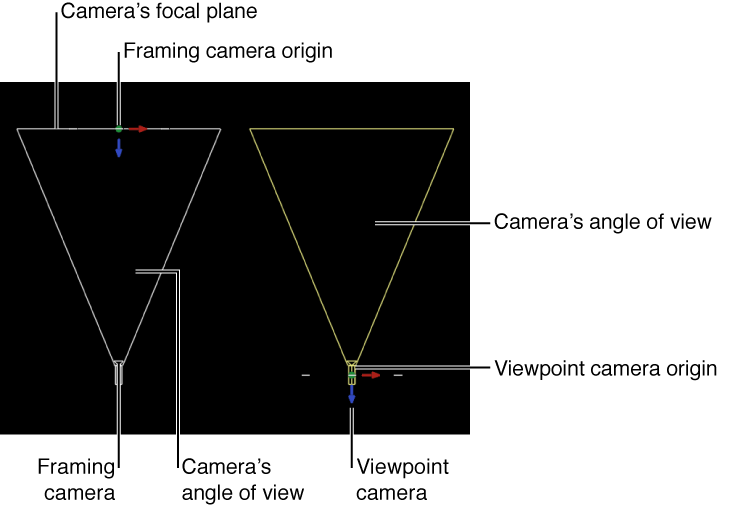
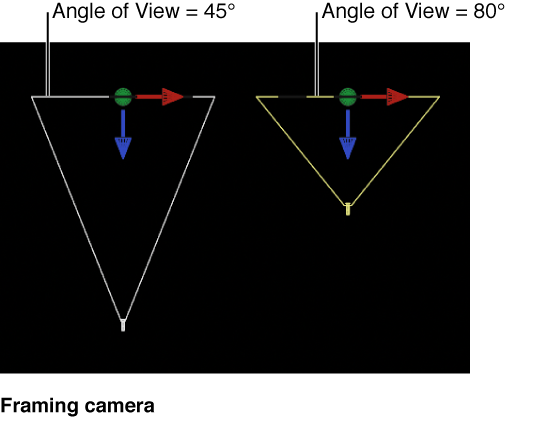
Angle of View: A slider to set the number of degrees in which the camera sees. Values range from 0 to 180 degrees.
Note: When you animate the Angle of View parameter on a Framing camera, the result is an opposing dolly effect. An opposing dolly zooms in the opposite direction that the camera moves. When you animate the Angle of View parameter on a Viewpoint camera, the result is a regular camera zoom.
Near Plane: A slider to set the distance where the camera begins to see objects. Objects closer to the camera than this distance are not rendered from this camera’s point of view.
Far Plane: A slider to set the distance where the camera ceases to see objects. Objects farther from the camera than this distance are not rendered from this camera’s point of view.
Near Fade: A slider to set the softness factor for the near plane. The softness factor sets a boundary range over which near objects fade in.
Far Fade: A slider to set the softness factor for the far plane. The softness factor sets a boundary range over which far objects fade out.
Note: Camera depth of field parameters are also contained in this window. For a complete description of these controls see Depth of field overview.