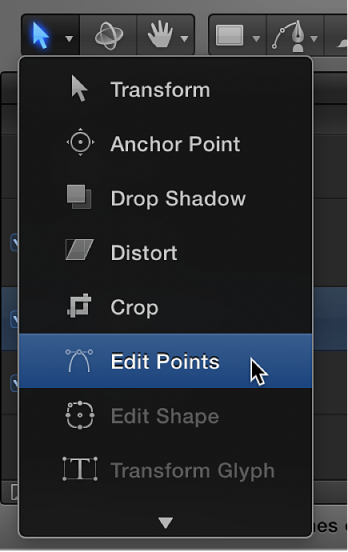

The methods used to adjust Bezier shapes are similar to those used by many other applications. Bezier control points are widely used to modify curves, and allow you to easily draw any shape you may need. Each point in a Bezier shape can be converted from a hard corner to a curve.
For all of the following procedures, use the Edit Points tool in the 2D transform tools pop-up menu.
Do one of the following:
Command-click a curved point to turn it into a corner (Linear) point.
Command-drag a corner point to turn it into a curved (Bezier) point, creating adjustable tangent handles.
Control-click selected points, then choose Linear or Smooth from the shortcut menu to change the control point type.
Curved Bezier control points have two tangent handles that you use to adjust the curvature of the shape on either side of the control point. These handles can be adjusted in various ways to create symmetrical and asymmetrical curves. By default, these tangent handles are locked to one another at an angle of 180 degrees, but you can override this restriction to adjust each tangent handle independently.
Do any of the following:
Drag a tangent handle to adjust its length. By default, the opposing tangent is locked to 180 degrees, and adjusting the angle of one tangent handle adjusts the other. However, you can adjust the length of each tangent handle independently.
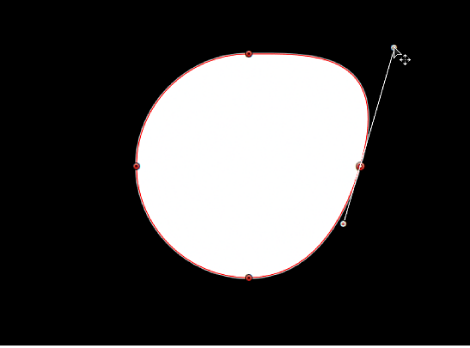
Option-drag either tangent handle to break the relationship between opposing tangent handles. After this relationship is broken, adjustments to one tangent handle have no effect on the other, and you can rotate both tangent handles freely.
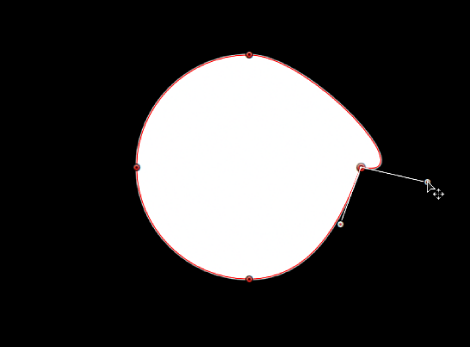
Control-click a tangle handle point, then choose Break Handle from the shortcut menu to break the relationship between opposing tangent handles.
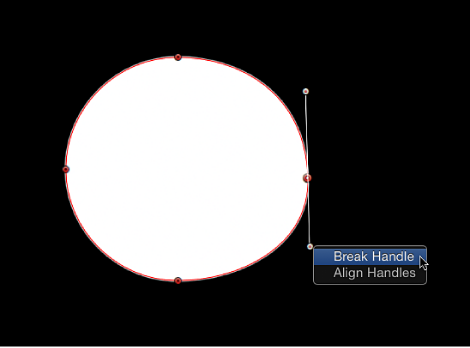
Option-drag a broken tangent handle or Control-click a handle point and choose Link Handle from the shortcut menu to lock the angle of the tangent handles together again. The tangent handles now maintain their relationship when moved and rotated.
You can also press Option-Command and drag a handle point so the tangent handles maintain their broken relationship when moved and rotated.
Control-click a handle point and choose Align Handles from the shortcut menu to align the tangent handles to a 180-degree angle.
Press Shift while you adjust a tangent handle to constrain its movement to 45-degree angles. To simultaneously modify the handles for more than one control point, Shift-select the points (on the same spline) and then adjust the tangent handles.
Important: If the Record button (in the transport controls under the Canvas) is enabled, curve adjustments are keyframed, creating animated shape changes. Additionally, if a keyframe has been added to the Control Points parameter in the Geometry pane of the Shape Inspector, curve adjustments are keyframed, regardless of the Record button state.