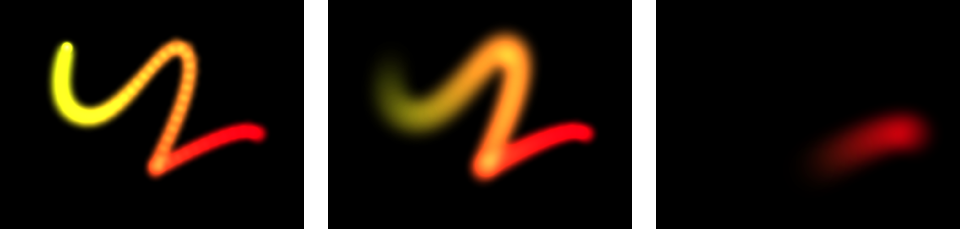

The Sequence Paint behavior animates the individual dabs of a paint stroke in sequence over time. This is the only way to animate the dabs individually—keyframing the stroke parameters or applying other behaviors affects all dabs in the stroke uniformly.
The Sequence Paint behavior is very similar to the Sequence Text and Sequence Replicator behaviors, which allow you to animate the Rotation, Color, Opacity, Scale, and Position parameters in sequence through the characters of a text layer or the elements of a replicator pattern. The Sequence Paint behavior adds Width to that list of parameters, allowing you to create sequenced animation through the dabs of a paint stroke.
For an example of using a sequence behavior, see Apply the Sequence Replicator behavior.
Before any sequencing animation can occur, you must add at least one parameter to the behavior in the Inspector, and then set a value for that parameter. Until a parameter is added, adjustments in the Inspector or HUD have no effect. You can add parameters to the Sequence Paint behavior and adjust the behavior using the following controls in the Behaviors Inspector:
Parameter: Add and Remove pop-up menus that add and remove parameters to the sequence. After you add the parameter, additional controls appear in the Behaviors Inspector (above the Add and Remove pop-up menus). Adjust those controls to create a sequence animation based on the difference between the original value of the dabs and the modified value. There are six menu options:
Rotation: Specifies (in degrees) the rotation of the stroke dabs. You can rotate the dial or use the value slider. Click the disclosure triangle next to the Rotation parameter to reveal separate X, Y, and Z Rotation controls.
Color: Specifies a color to tint the stroke dabs. You can click the color well to choose a color, or open the disclosure triangle and use the Red, Green, and Blue sliders.
Opacity: Defines the opacity of the stroke dabs. Set a new value using the slider.
Scale: Defines the scale of the stroke dabs. Click the disclosure triangle next to the Scale parameter to reveal separate X Scaling and Y Scaling subparameters to scale the width and height of the dabs separately. By default, Scale is set to 100%—the size of the stroke dabs is equal to the original size defined in the stroke parameters.
Width: Defines the width of the dabs. Unlike Scale, Width adjustments alter the size of the dab while also maintaining the spacing between each dab. Set a new value using the slider.
Position: Defines the offset of the dabs from their original position. Click the disclosure triangle next to the Position parameter to reveal separate X, Y, and Z Position subparameters. For example, to create an animation in which the dabs move upward in the Y axis over the paint stroke, enter a positive value in the Y Position field.
Sequencing: A pop-up menu that specifies how the sequence animation (the value change from the original parameter value to the value set in the Sequence Paint parameters) moves through the dabs of the stroke. The starting point for the sequence animation is based on the first control point of the paint stroke. (To change the start point of the shape, select the shape, click and hold the 2D transform tools pop-up menu in the toolbar and choose the Edit Points tool, then Control-click a control point in the Canvas and choose Set Start Point from the shortcut menu.) There are five Sequencing options:
To: The animation begins at the original value of the dabs and moves to the value set in the Sequence Paint behavior for that parameter. For example, if the original opacity value of a stroke is 100%, and opacity is set to 0% in the Sequence Paint parameters, the dabs begin completely opaque and become completely transparent.
From: The animation moves from the value set in the Sequence Paint behavior to the original value of the stroke. For example, if the original opacity value of a stroke is 100%, and opacity is set to 0% in the Sequence Paint parameters, the dabs begin completely transparent and become completely opaque. This is the opposite of the To Sequencing option.
Through: The sequence goes through a full animation cycle starting at the original value of the stroke, moves to the value set in the Sequence Paint behavior, and then returns to the original value of the stroke. For example, if the original opacity value of a stroke dab is 100%, and opacity is set to 0% in the Sequence Paint parameters, the dabs begin completely opaque, become transparent, and then become completely opaque again.
Through Inverted: The sequence goes through an inverted animation cycle starting from the value set in the Sequence Paint behavior, moving to the original value of the stroke, and then returning to the value set in the Sequence Paint behavior. For example, if the original opacity value of a stroke is 100%, and opacity is set to 0% in the Sequence Paint parameters, the dabs begin completely transparent, become opaque, and then become completely transparent. This is the opposite of the Through option.
From Keyframes: Lets you keyframe how the animation moves through the values set in the Sequence Paint parameters over a stroke. Each dab undergoes the same value sequence. When Custom is selected, added parameters must be animated to yield any effect.
Unit Size: A pop-up menu that specifies whether the sequence animation is applied to the stroke as a whole, to its individual dabs, or to a custom range. There are three options:
Dab: Applies the sequence animation over each dab as its own entity. Dab is the default setting.
All: Applies the sequence animation to all stroke dabs simultaneously.
Custom: Lets you specify the percentage of dabs on the stroke affected by the sequence animation at once. Although you can create keyframes for the Custom option, it’s not required to affect the sequence. Use Custom to define an area of dabs affected by the sequence.
Start: A slider (available when Unit Size is set to Custom) that sets the starting point for the dabs on the stroke affected by the animation.
End: A slider (available when Unit Size is set to Custom) that sets the ending point for the dabs on the stroke affected by the animation.
Spread: A slider that, when increased, creates a softer transition between dabs. (This parameter control is not available when Unit Size is set to All.)
Traversal: A pop-up menu that sets the action of the sequence behavior to any of the following options:
Constant Speed: Moves the animation from the origin of the paint stroke through the end of the stroke at a constant speed.
Ease In: The sequence animation begins slowly and increases to normal speed as it moves through the paint stroke.
Ease Out: The sequence animation begins at normal speed and slows toward the end of the paint stroke.
Ease In/Out: The sequence animation begins slowly, increases to normal speed as it moves toward the middle of the stroke, and slows as it reaches the end of the paint stroke.
Accelerate: The sequence animation increases in speed.
Decelerate: The sequence animation decreases in speed.
Custom: Lets you keyframe how the animation moves through the paint stroke.
Loops: A slider that sets the number of times the animation sequences through the paint stroke over its duration.
Note: Loops is not available when Traversal is set to Custom.
Location: A slider (available when Traversal is set to Custom) that defines the location of the stroke where the animation is in effect.
For more information on using the Custom Traversal option, see Control sequence timing with keyframes.
End Condition: A pop-up menu that determines how the sequence animation is repeated over the duration of the sequence behavior. This parameter has no effect for Loop values less than or equal to 1. The End Condition options are:
Hold: Completes the sequence animation cycle one time, then starts it over again from the beginning (after the last dab in the sequence has completed its animation).
Wrap: Treats the sequence animation as a continuous loop so the spread wraps from the last dab in the sequence to the first dab.
Ping Pong: Completes the sequence animation cycle forward, then completes the animation backward, then forward, and so on.