
The Randomize Shape behavior animates the control points of a shape by applying a random offset to each point of the shape.
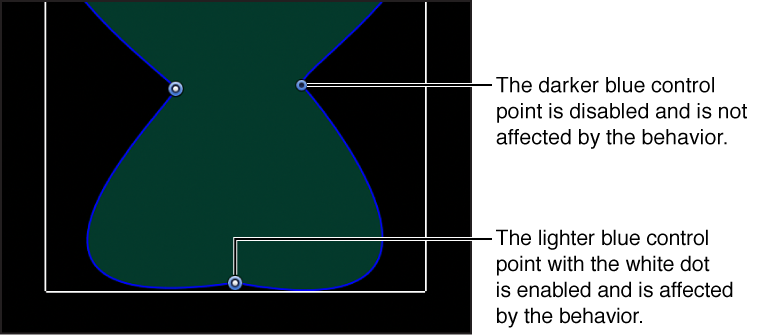
When the Randomize Shape behavior is applied to a shape, all control points of the shape are affected by default. When the behavior is selected, affected control points appear blue with white dots in the center of the point on the blue shape behavior spline. To disable control points, click the control points. A disabled point is a darker blue with a dark dot in the center of the point.
Note: When you apply the Randomize Shape behavior to a simple shape (without control points), a dialog appears asking if you want to convert the shape.
You can adjust the Randomize Shape behavior using the following controls in the Behaviors Inspector:
Amount: A slider (available when Apply Mode—described below—is set to Add, Subtract, or Add and Subtract) that defines the maximum value the Randomize behavior will generate.
Multiplier: A slider (available when Apply Mode—described below—is set to Multiply) that defines the maximum value the Randomize behavior will generate.
Apply To: A pop-up menu that defines where on the shape the behavior is applied. There are three options:
Points: The control points of the shape are randomized, changing their position over the duration of the behavior.
Tangents: The control points’ tangent handles (rather than the control points themselves) of the shape are randomized. The control points stay in a fixed position while the curves between the points are animated.
Points and Tangents: Both the control points and handles are animated.
Apply Mode: A pop-up menu that determines how values generated by this behavior are combined with other behaviors and keyframes that affect the same parameter. There are four options:
Add: Values generated by this behavior are added to other behaviors and keyframes that affect the same parameter.
Subtract: Values generated by this behavior are subtracted from other behaviors and keyframes that affect the same parameter.
Multiply: Values generated by this behavior are multiplied by other behaviors and keyframes that affect the same parameter.
Add and Subtract: Values generated by this behavior are added to and subtracted from other behaviors and keyframes that affect the same parameter.
Frequency: A slider that lets you adjust the amount of random variation per second. Higher values generate faster variations, whereas lower values generate slower variations.
Noisiness: A slider that adds an additional overlay of random variance to the Frequency you’ve set. Higher Noisiness values result in more erratic variations in the affected parameter.
Link: A checkbox, available when you apply this behavior to a two-dimensional parameter (such as Distort) or three-dimensional parameter (such as Position or Rotation) that consists of X, Y, and/or Z values. Select this checkbox if you want the transformation applied to the X and Y vertices to be the same. For instance, a +10 change to X will result in an identical +10 change to Y.
Preserve Angle: A checkbox that, when selected, causes the tangent handles become (or remain) flat, maintaining the continuity of the curves.
Random Seed: A button to select a new random seed number. This number is used to randomly generate new sequences of values, based on the other parameters of this behavior.