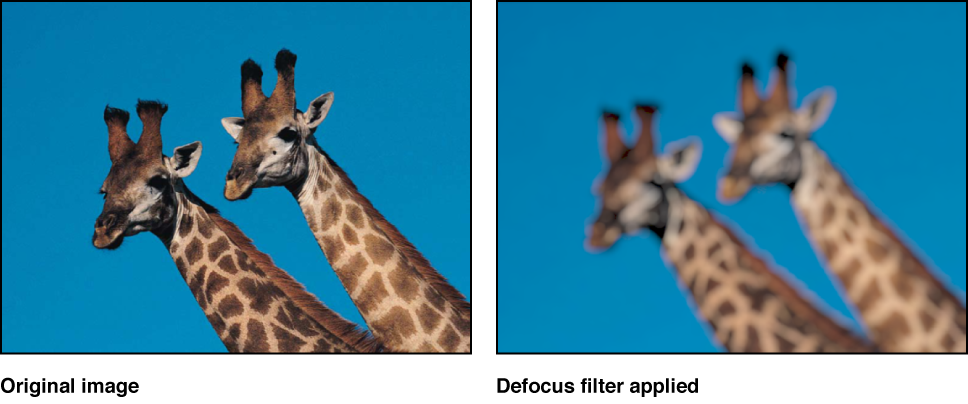

Simulates the out-of-focus effect that occurs through a real-world camera lens. The Defocus filter blurs an image while creating realistic lens artifacts that mimic the aperture shape in a camera in brighter areas of the image. You can customize the shape of the blur.
Tip: Use this filter when you’re trying to blur an image to match video or stills shot with a camera. For example, if you key a woman standing in front of a blue screen, and you intend to place a background image behind her to make it look like she’s standing in a valley with mountains in the background, use the Defocus filter instead of a Gaussian Blur filter to create a realistic depth-of-field effect for the mountains in the distance.
Adjust this filter using the parameter controls in the Filters Inspector:
Amount: Sets the radius of the defocus effect.
Gain: Sets the amount of gain applied to the high-luminance areas.
Shape: Sets the shape of the lens aperture to Circle or Polygon.
Sides: Sets the number of sides of the lens aperture, if Shape is set to Polygon.
Rotation: Sets the angle of rotation of the polygonal lens aperture, if Shape is set to Polygon.
Aspect Ratio: Sets the aspect ratio of the lens aperture.
Crop: Sets whether the filtered image is sharply cropped at its original boundaries. When this checkbox is deselected, the filter affects the edges of the image.
Mix: Sets the percentage of the original image to be blended with the blurred image.