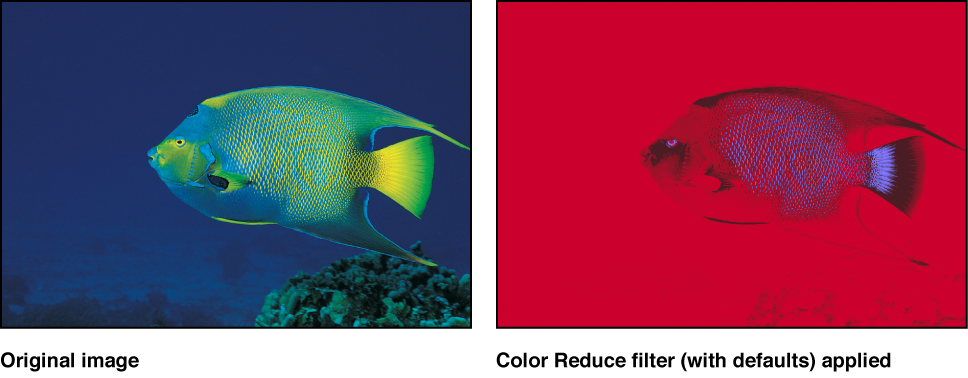

Reduces the full range of color in an image to two, three, or four colors that you select. Depending on the number of substitute colors you choose in the Reduce To parameter, this filter breaks down the full range of colors in the image into a color range for each Match Color parameter that’s available. The filter then substitutes the selected Replace With color for each interpreted range of color.
If two colors are selected, color information in the layer is reduced to the selected two colors; if three colors are selected, color information is reduced to three colors; and so on.
Adjust this filter using the parameter controls in the Filters Inspector:
Smoothness: Sets the smoothness of the transitions between reduced areas. Values range from 0 (hard edges) to 1 (smooth blending).
Reduce To: Selects the number of colors in the reduced layer. Choices are 4 Colors, 3 Colors, or 2 Colors.
Match Color 1: Picks the color of the first selection color for reduction. The color controls can be expanded with the disclosure triangle to reveal Red, Green, and Blue sliders for more precise color selection.
Replace With: Picks the color that’s substituted for the selection determined by Color 1.
Match Color 2: Picks the color of the second selection color for reduction.
Replace With: Picks the color that’s substituted for the selection determined by Color 2.
Match Color 3: Picks the color of the third selection color for reduction. This parameter is used only if Reduce To is set to 3 Colors or 4 Colors.
Replace With: Picks the color that’s substituted for the selection determined by Color 3. This parameter is used only if Reduce To is set to 3 Colors or 4 Colors.
Match Color 4: Picks the color of the fourth selection color for reduction. This parameter is used only if Reduce To is set to 4 Colors.
Replace With: Picks the color that’s substituted for the selection determined by Color 4. This parameter is used only if Reduce To is set to 4 Colors.
Mix: Sets the percentage of the original image to be blended with the color-corrected image.