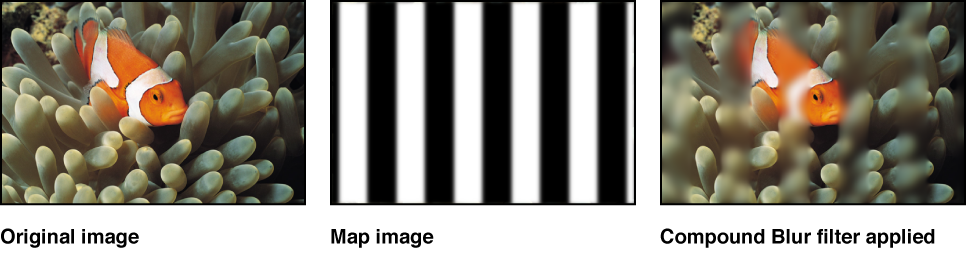

Blurs an object using the specified channel of a designated image used as a map image. Use a shape, text layer, still image, or movie file as the map image, then designate the red, green, blue, alpha, or luminance channel to create the shape of the blur.
Tip: Use this filter to blur specific sections of an image. For example, trace the subject of the image to blur with a Bezier or B-spline shape, then assign this shape as the Blur Map image. Use its Luminance or Alpha channel to define the blurred area, then disable the original shape layer in the Layers list to hide the source of the blur. For more information, see Edit shape fill, outline, and feathering.
Adjust this filter using the parameter controls in the Filters Inspector:
Amount: Sets the radius of the blur.
Blur Map: An image well to set the map image. Drag a layer (an image, shape, text object, and so on) from the Layers list into the well.
Note: You can also apply or replace the blur map by dragging the source layer onto the filter in the Layers list.
Map Channel: Sets the channel to be blurred: red, green, blue, alpha, or luminance.
Invert Map: Sets whether the blur map is inverted.
Stretch Map: Stretches (or compresses) the map image so it exactly overlaps the image the filter is applied to.
Horizontal: Sets the percentage of maximum horizontal blur.
Vertical: Sets the percentage of maximum vertical blur.
Mix: Sets the percentage of the original image to be blended with the blurred image.