Applying behaviors to particle systems is a quick and easy way to move emitters in your project and to create nearly limitless animations.
With all Basic Motion behaviors, after individual particles emerge, they’re unaffected by changes to the position of the emitter. This means that moving the emitter around the screen using behaviors results in the creation of a trail of particles that behave according to their particle cell parameters.
There are two ways to apply behaviors to a particle system:
To the emitter: Behaviors applied to emitters affect the emitter itself, not its individual particles. For example, using the Throw behavior to send an emitter flying across the Canvas creates a trail of particles.
To the emitter cell: Behaviors applied to cells are in turn applied to each particle generated from that cell. This can result in some extremely complex animations as dozens of particles move according to the behaviors you’ve defined. Behaviors applied to cells have no effect on the position of the emitter.
Apply a behavior to an emitter
Do one of the following:
Drag a behavior from the Library onto an emitter in the Canvas, Layers list, or Timeline.
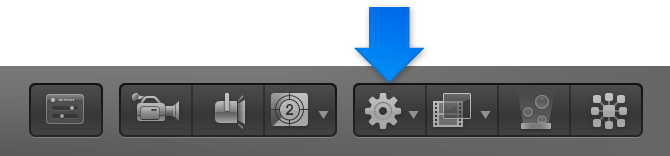
Select the emitter, click the Add Behavior pop-up menu in the toolbar, then choose a behavior.
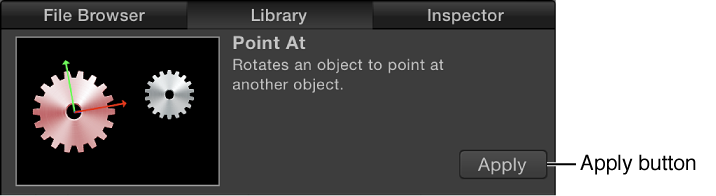
Select an object in the Canvas, Layers list, or Timeline, then select a behavior from the Library stack and click Apply in the preview area.
In the Canvas, the emitter begins to move according to the parameters of the applied behavior.
Note: Not all behaviors instantly activate an object when applied. For example, you must adjust the Throw Velocity parameter of a Throw behavior to cause an object to move.
Apply a behavior to a cell
Behaviors applied to cells are in turn applied to each particle generated from that cell.
Do one of the following:
Drag a behavior from the Library onto a cell in the Layers list.
Select a cell in the Layers list, click the Add Behavior pop-up menu in the toolbar, then choose a behavior.
Select a cell in the Layers list, then select a behavior from the Library stack and click Apply in the preview area.
The emitter begins to move according to the parameters of the applied behavior.
Note: Not all behaviors instantly activate an object when applied. For example, you must adjust the Throw Velocity parameter of a Throw behavior to cause an object to move.
Tip: If you do not see the expected result when applying behaviors to particle cells, try selecting or deselecting the Affect Subobjects checkbox (in the Behaviors Inspector) or selecting a different option from the Affect pop-up menu in the HUD or Behaviors Inspector. These parameters determine whether the entire object (such as the particle emitter) or its components (such as the particle cells) are affected by the behavior and how an object interacts with surrounding objects, respectively. (The Affect Subobjects checkbox appears in the Behaviors Inspector only when the Throw and Spin behaviors are applied to a group containing multiple objects, such as a group, particle emitter, or text.)
In the Canvas, the emitter begins to move according to the parameters of the applied behavior.
Note: Not all behaviors instantly activate an object when applied. For example, you must adjust the Throw Velocity parameter of a Throw behavior to cause an object to move.
Tip: If you do not see the expected result when applying behaviors to particle cells, try selecting or deselecting the Affect Subobjects checkbox (in the Behaviors Inspector) or selecting a different option from the Affect pop-up menu in the HUD or Behaviors Inspector. These parameters determine whether the entire object (such as the particle emitter) or its components (such as the particle cells) are affected by the behavior and how an object interacts with surrounding objects, respectively. (The Affect Subobjects checkbox appears in the Behaviors Inspector only when the Throw and Spin behaviors are applied to a group containing multiple objects, such as a group, particle emitter, or text.)
Apply a Parameter behavior to an emitter or cell parameter
You can apply Parameter behaviors to parameters in the Emitter or Particle Cell Inspector. A Parameter behavior is a special kind of behavior that animates a single parameter of an object.
Do one of the following:
Drag a behavior from the Parameter category of behaviors in the Library onto an emitter or cell in the Layers list or Timeline, then, in the Behaviors Inspector, click the To pop-up menu and choose a parameter from the submenus.
Select an emitter or cell in the Layers list or Timeline, click the Add Behavior pop-up menu in the toolbar, and choose a Parameter behavior; then, in the Behaviors Inspector, click the To pop-up menu and choose a Parameter from the submenus.
In the Emitter or Particle Cell Inspector, Control-click a parameter, then choose a Parameter behavior from the shortcut menu.
The Parameter behavior is applied to the parameter you chose. Play back your project to see the result.