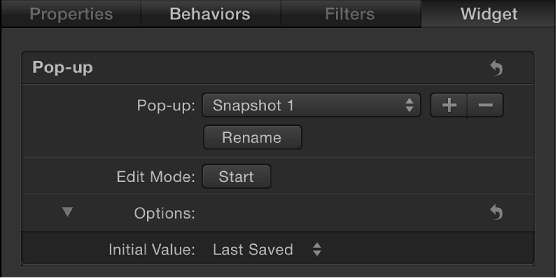

Pop-up menu widgets are similar to checkbox widgets but allow you to save more than two parameter states (snapshots). Each item in a pop-up menu widget represents a snapshot. When you choose an item in the pop-up menu, the affected parameters in your project toggle to a different saved state.
The activation checkboxes in the Rig Inspector (highlighted blue when selected) and in the Layers list (beside the pop-up menu widget) have no effect on the constituent parameters of the pop-up menu.
Pop-up menu widgets contain the following controls in the Rig Inspector and Widget Inspector:
Pop-up: Use this widget control to switch between multiple saved snapshots.
Rename: Use this button to enter a custom name for the item in the pop-up menu.
Add/Delete: Click the Add button (+) to add an item to the pop-up menu; click the Delete button (–) to remove an item. Each item represents a new snapshot.
Edit Mode: Click the Start button to enable snapshot recording. For more information about recording snapshots, see Snapshots overview.
Note: When you record a snapshot (using the Edit Mode button or the methods described in Snapshots overview), the affected parameters (those you modify in the Inspector or via onscreen controls in the Canvas) are added to the widget. When you finish recording a snapshot, new controls for the modified parameters appear in the Widget Inspector. These parameters are duplicates of the same parameters that occur in other Inspector panes. Parameters controlled by a rig display a special icon (a joystick) on the right side of the parameter row in the Inspector.
Initial Value: Use this control (in the Options section) to set the initial value for the pop-up menu widget when it’s published and used as a template in Final Cut Pro X. There are three options:
Last Saved: When the template is used in Final Cut Pro, the pop-up menu value defaults to the menu item assigned when the project was last saved. This option ensures a consistent pop-up menu state, while still permitting users to choose alternate states manually. This is the default setting.
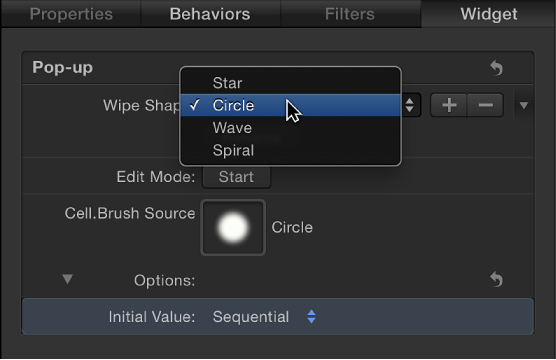
Sequential: Each time the template is used (in a single project) in Final Cut Pro, the setting of this pop-up menu changes, rotating through the available menu items. The first time the template is used, this pop-up menu defaults to the first menu item. The next time the template is used, the pop-up menu is set to the second menu item, and so on. For example, in a wipe transition template with a pop-up menu widget assigned to control the shape of the wipe, the first time you add the template to the Final Cut Pro timeline, the wipe is a star; the next time you apply the template to the Final Cut Pro timeline, the wipe is a circle, and so on.
Random: Each time the template is used in Final Cut Pro, another menu item from this pop-up menu is assigned by default. For example, in a title template with a pop-up menu widget assigned to control the title’s font, each successive time the title is used in a project, a font is randomly selected from the font list.