
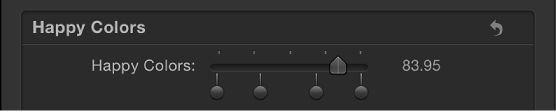
Slider widgets let you select values interpolated between snapshots. When you drag the slider, the affected parameters change gradually, ramping between the values of adjacent snapshots. Each snapshot assigned to a slider is represented by a separate snapshot tag—a small shaded circle underneath the slider widget.
For information on adding snapshot tags, see the tasks in Create and manage snapshots.
Clicking a snapshot tag sets the value of the slider to the tag’s value and enables the tag’s snapshot for editing. Setting the slider to values between tags causes the rigged parameter values to be interpolated between the surrounding snapshot values.
The activation checkboxes in the Rig Inspector (highlighted blue when selected) and in the Layers list (beside the slider widget) have no effect on the constituent parameters of the slider.
Slider widgets contain the following controls in the Rig Inspector and Widget Inspector:
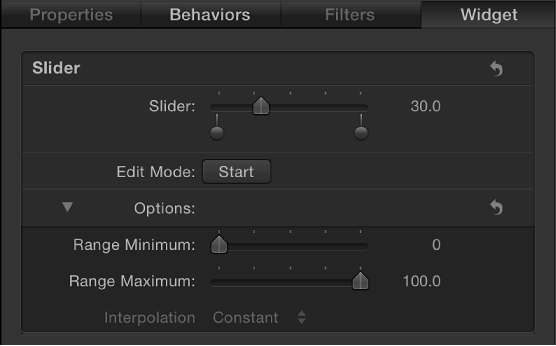
Slider: Use this widget control to move between snapshots. The snapshot tags beneath the slider indicate the saved snapshots.
Snapshot tags: The small (unlabeled) shaded circles underneath the slider indicate saved snapshots. Double-click below the slider to add snapshot tags. Add as many snapshot tags as you want. Snapshot tags work similarly to tags that represent individual colors in a gradient. To learn how tags are used when creating gradients, see Gradient editor controls.
Edit Mode: Click the Start button to enable snapshot recording. For more information about recording snapshots, see Snapshots overview.
Note: When you record a snapshot (using the Edit Mode button or the methods described in Snapshots overview), the affected parameters (those you modify in the Inspector or via onscreen controls in the Canvas) are added to the widget. When you finish recording a snapshot, new controls for the modified parameters appear in the Widget Inspector. These parameters are duplicates of the same parameters that occur in other Inspector panes. Parameters controlled by a rig display a special icon (a joystick) on the right side of the parameter row in the Inspector.
Range Minimum: Use this parameter (in the Options section) to set the low end of the numeric range displayed next to the slider widget. For example, if you want the slider widget to range from 0 to 11, set Range Minimum to 0.
Range Maximum: Use this parameter (in the Options section) to set the high end of the numeric range displayed next to the slider widget. For example, if you want the slider widget to range from 0 to 11, set Range Maximum to 11. If you want the slider widget to range from 0 to 100, set Range Maximum to 100.
Note: Range Minimum and Range Maximum have no effect on the actual parameter values that the slider widget controls. Range Minimum and Range Maximum merely designate an arbitrary numeric range that’s displayed next to the slider widget.
Interpolation: Use this pop-up menu (in the Options section) to set how values on the slider are interpolated. The interpolation applies to the segment of the slider between the current snapshot tag and the next one. You can set interpolation methods for each segment of the slider. By default, all segments are set to Linear. There are three menu options:
Constant: Holds the value of the first snapshot until the slider reaches the next snapshot, at which point the parameter changes. (This is similar to changing states using a pop-up menu widget.)
Linear: Creates a simple interpolation between states.
Ease: Creates a smooth interpolation, where the effect is weighted towards the nearer snapshot tag.