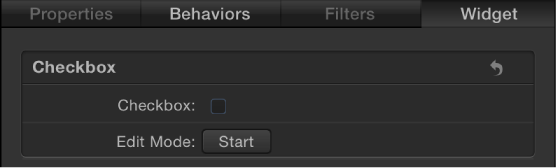

Checkbox widgets allow you to switch between two snapshots—that is, between two sets of parameter states. Typically, checkbox widgets are used to create an on/off type of effect, although you can store any parameter states in either snapshot, creating more of a toggle effect.
The activation checkboxes in the Rig Inspector (highlighted blue when selected) and in the Layers list (beside the checkbox widget) have no effect on the constituent parameters of the checkbox.
Checkbox widgets contain the following controls in the Rig Inspector and Widget Inspector:
Checkbox: Use this widget control to switch between two snapshots (parameter states).
Edit Mode: Click the Start button to enable snapshot recording. For more information about recording snapshots, see Snapshots overview.
Note: When you record a snapshot (using the Edit Mode button or the methods described in Snapshots overview), the affected parameters (those you modify in the Inspector or via onscreen controls in the Canvas) are added to the widget. When you finish recording a snapshot, new controls for the modified parameters appear in the Widget Inspector. These parameters are duplicates of the same parameters that occur in other Inspector panes. Parameters controlled by a rig display a special icon (a joystick) on the right side of the parameter row in the Inspector.