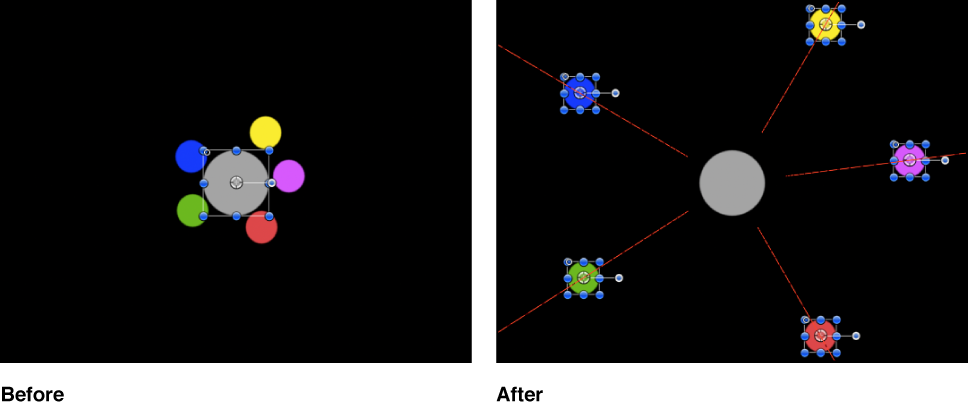

If you apply the Repel behavior to an object, that object pushes away all other objects within the area of influence in the Canvas. The strength with which objects are pushed away can be increased or decreased, as can the distance repelled objects travel.
You can also specify which objects are affected by this behavior, creating an effect where only specific objects are moved, while others remain still.
The Repel behavior is the opposite of the Attractor behavior, and is part of a group of simulation behaviors that create complex animated relationships between two or more objects.
Adjust this behavior using the controls in the Behaviors Inspector:
Affect: A pop-up menu that limits which objects in your project are affected by the Repel behavior. There are three options:
All Objects: All objects in the Canvas are affected by the Repel behavior.
Related Objects: The default setting. Only other objects in the same group as the repelling object are affected.
Specific Objects: Only objects appearing in the Affected Objects list are affected by the Repel behavior.
Affected Objects: A list that appears when Specific Objects is chosen in the Affect pop-up menu. Drag objects from the Layers list into this list to be affected by the Attractor behavior when the Specific Objects option is selected in the Affect pop-up menu. To remove an item from the list, select the item and click Remove. The Affected Objects list contains the following columns:
Layer: This column lists the name of the layer containing the object.
Name: This column lists the name of the object.
Strength: A slider that defines the speed at which repelled objects move away from the object. With a value of 0, repelled objects don’t move at all. The higher the value, the faster repelled objects move.
Falloff Type: A pop-up menu that determines whether the distance defined by the Influence parameter falls off linearly or exponentially.
Linear: Repulsion between objects falls off in proportion to the object’s distance.
Exponential: The closer an object is within the area of influence, the more strongly it is repelled, and the faster it moves away from the object doing the repelling.
Falloff Rate: A slider that sets how quickly the force of repulsion between objects affected by this behavior falls off. A low Falloff Rate value results in objects quickly getting up to speed as they move away from the object of repulsion. A high Falloff Rate causes objects to accelerate much more slowly. When set to Exponential, the attraction falls off more quickly than when set to Linear.
Influence: A slider that defines the radius of the circle of influence in pixels. Objects that fall within the area of influence move away from the object of repulsion. Objects outside the area of influence remain in place.
Drag: A slider that reduces the distance repelled objects travel away from the repelling object.
Include X, Y, and Z: Buttons that specify the space in which the objects move away from the object with the applied Repel behavior. For example, when X and Y are enabled, the object moves away in the XY plane; when Y and Z are enabled, the object moves away in the YZ plane.