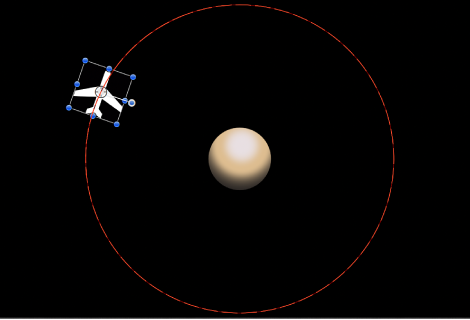

The Move behavior places a point in the Canvas that creates a specific location for an object or group to move toward or away from in a straight line. When used with other behaviors, Move can create complex motions. For example, in the following illustration, an Orbit Around behavior is applied to the airplane shape.
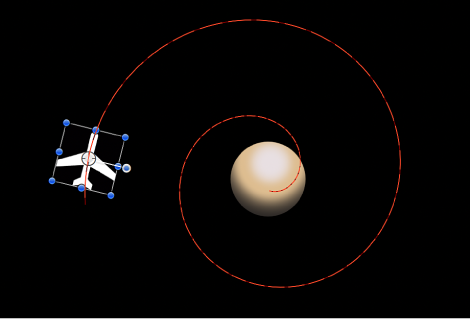
In the next illustration, a Move behavior is added to the airplane shape. The destination point of the Move path is positioned in the center of the circle. While the airplane circles around (obeying the Orbit Around behavior), it is also drawn to the center of the target (obeying the Move behavior), creating a spiraling motion path.
Tip: The Move behavior is useful in 3D mode because it lets you simulate camera movements without using a camera. For example, when you apply the Move behavior to a group that contains objects offset in Z space, you can create a dolly-like move.
Adjust this behavior using the controls in the Behaviors Inspector:
Position: Value sliders to define the X, Y, and Z position of the target point. The target (the end of the Move path) is placed at the center of the Canvas by default.
Note: You can also drag the target point in the Canvas using the Adjust Item tool.
Strength: A slider defining the speed at which the object moves toward the target. With a value of 0, the object doesn’t move at all. The higher the value, the faster the object moves.
Direction: A pop-up menu that sets whether the object moves toward the target point or away from the point.
Speed: A pop-up menu that defines the object’s velocity from its position in the Canvas to the position of the target. There are six choices:
Constant: The object moves at a steady speed from its position toward the target.
Ease In: The object starts at a slow speed, then reaches and maintains a steady speed toward the target.
Ease Out: The object starts at a steady speed, then gradually decelerates to a stop when it reaches the target.
Ease Both: The object slowly accelerates, then decelerates to a stop when it reaches the target.
Accelerate: The object moves toward the target with increasing speed.
Decelerate: The object moves toward the target with decreasing speed.
Note: To move the object more slowly toward its target, extend the duration of the Move To behavior in the Timeline or mini-Timeline. To move the object faster, shorten the duration of the behavior.