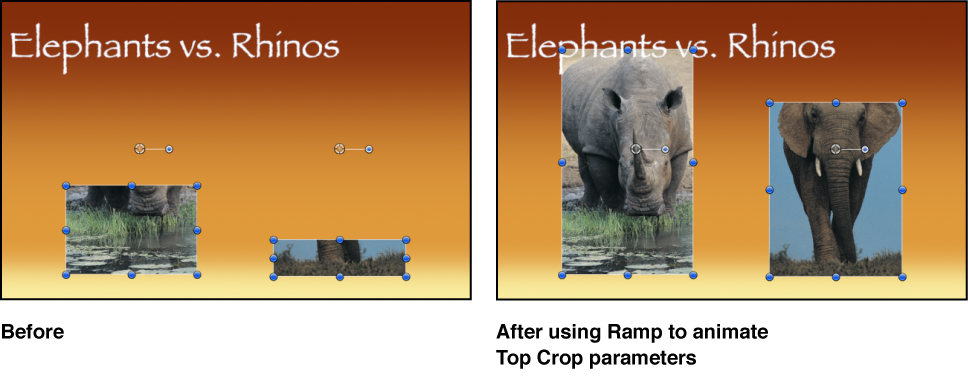

The Ramp behavior creates a gradual transition in any parameter that can be animated, from the Start Value to the End Value. The speed of the transition is defined by the length of the Ramp behavior in the Timeline, and by the behavior’s end value. Additional parameters allow you to define how the transition occurs; whether it’s at a single, continuous speed; or whether it accelerates over time.
Ramp is a versatile behavior. If you apply it to the Scale property, it works like the Grow/Shrink behavior. If you apply it to the Opacity property, you can fade an object in or out in different ways. Although you can use the Ramp behavior to mimic other Motion behaviors, it can be applied to any parameter. It’s an additive behavior, meaning that the value it generates is added to the original value of the parameter to which it’s applied.
For example, to animate different segments of a bar graph so each segment grows to a specific length, apply the Ramp behavior to the each bar’s Crop parameter. After you arrange the different bars with their starting Crop values, the Ramp behaviors move the Top Crop parameter up, giving the illusion that each bar is growing. Set the End Value parameter of each Ramp behavior to the length you want each bar to reach, and you’re done!
Adjust this behavior using the controls in the Behaviors Inspector:
Start Value: A slider to set the value that’s added to the parameter at the first frame of the Ramp behavior.
End Value: A slider that sets the value the Ramp behavior reaches at the last frame of the behavior. Over the life of the behavior, the parameter that the Ramp behavior is applied to transitions from the Start Value to the End Value, plus the original value.
Curvature: A slider that eases the acceleration at which the Ramp behavior transitions from the Start Value to the End Value. Higher Curvature values result in an ease in/ease out effect, where the transition begins slowly, gradually speeds up as the behavior continues, then gradually slows to a stop as it reaches the end. Because Curvature is defined by the length of the behavior in the Timeline, this parameter does not affect the overall duration of the effect.
Start Offset: A slider that delays the beginning of the behavior’s effect relative to the first frame of its position in the Timeline, in frames. Adjust this parameter to make the behavior start later.
End Offset: A slider that offsets the end of the behavior’s effect relative to the last frame of its position in the Timeline, in frames. Adjust this parameter to make the behavior stop before the end of the behavior bar in the Timeline. Using this slider to stop the effect, instead of trimming the end of the behavior bar in the Timeline, freezes the end of the effect for the remaining duration of the object. Trimming the end of the behavior bar resets the object to its original parameter.
Apply To: A pop-up menu that shows the parameter affected, and that can be used to reassign the behavior to another parameter.