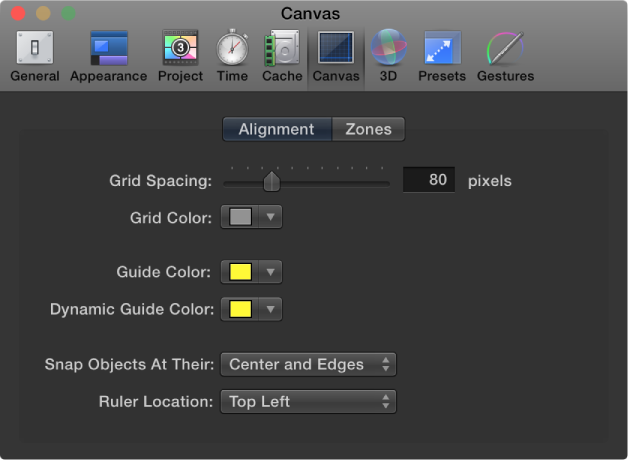

Canvas preferences customize your Canvas view. Changes made in this pane take immediate effect in your current project.
Alignment
These settings control the color and display of the optional grid, rulers, and guides that appear in the Canvas. Grids, guides, and rulers can be turned on and off in the View menu or in the View pop-up menu in the upper-right corner of the Canvas.
Grid Spacing: A slider that sets the width for the grid in pixels.
Grid Color: A color control that sets the color of the grid lines.
Guide Color: A color control that sets the color of guides.
Dynamic Guide Color: A color control that sets the color for dynamic guides.
Snap Objects At Their: A pop-up menu that defines how objects are aligned with other objects when moved in the Canvas. There are three options:
Center: Aligns objects at their centers.
Edges: Aligns object at their edges.
Center and Edges: Aligns objects at their centers and edges.
Ruler Location: A pop-up menu the sets the position of the ruler in the Canvas. There are four options:
Bottom Left
Top Left
Top Right
Bottom Right
Zones
These settings control safe zone sizes and colors. Safe zones are special guides to help you avoid placing images in areas of the screen that might not appear correctly on consumer television sets. Images that appear outside the action-safe region might be cut off. The area outside the title-safe region might have distortions that make text hard to read.
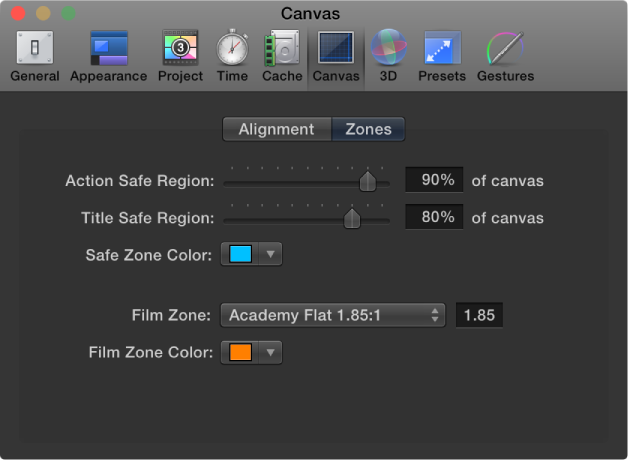
When producing output to be used for both television and film, it’s helpful to see the area of the TV frame that will be cut off when the clip is converted to film. The film zone settings allow you to display a guide that identifies the aspect ratio of the film gauge you are working in.
The safe zone and film zone guides can be turned on and off in the View menu, or in the View pop-up menu in the upper-right corner of the Canvas.
Action Safe Region: A slider that sets the percentage of the Canvas where the action-safe guides appear. (Default is 90% of Canvas.)
Title Safe Region: A slider that sets the percentage of the Canvas where the title-safe guides appear. (Default is 80% of Canvas.)
Safe Zone Color: Controls that set the color of the safe zone guides.
Film Zone: A pop-up menu that sets the guide size to match a standard aspect ratio. Entering a number into the value field to the right of the pop-up menu sets a custom aspect ratio. There are five menu choices:
Academy Flat 1.85:1
Anamorphic Scope 2.35:1
High Definition 16:9
Academy Standard 4:3
Custom
Film Zone Color: Controls that set the color of the film zone guides.