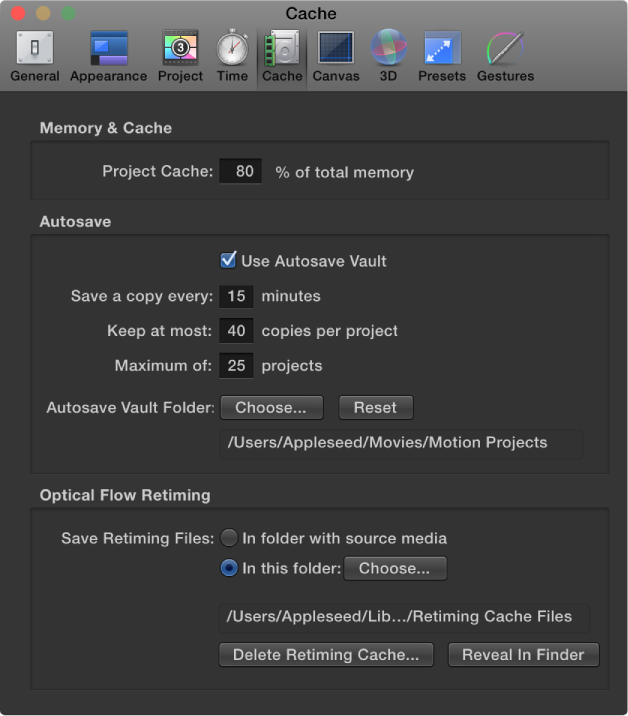

Cache preferences affect memory management and disk usage for projects.
Memory & Cache
Project Cache: A value field that specifies the percentage of your total system memory to use for the project cache. Enter a larger number to make more memory available to Motion to cache frames, to ensure consistently smooth playback.
Autosave
These settings control how frequently projects are saved, as well as the location of the saved files. Saved projects are time- and date-stamped. For more information about customizing autosave, see Save, autosave, and revert projects.
Use Autosave Vault: A checkbox that, when selected, stores autosaved projects to the location specified by the Autosave Vault Folder path. By default, the Autosave Vault folder is located in the Users/username/Movies/Motion Projects/ folder.
Save a copy every: A value field that specifies how often, in minutes, a project is saved.
Keep at most: A value field that specifies how many versions of the autosaved project to store in the vault.
Maximum of: A value field that specifies the maximum number of autosaved projects to store in the vault.
Autosave Vault Folder: A group of controls that let you set where the autosave files are kept. The Reset button sets the autosave location back to its default.
Optical Flow Retiming
When you retime footage, Motion stores the retiming files on your computer. The settings in this section specify the storage location.
Save Retiming Files: Two buttons that set the storage location of retimed footage:
In folder with source media: When enabled, this button tells Motion to save the retiming files in the same location as the source footage.
In this folder: When enabled, this button sets a custom storage location. Click Choose, then select a new location in the file dialog. By default, the Optical Flow folder is located in the /Users/username/Library/Caches/com.apple.motionapp/Retiming Cache Files/ folder.
Delete Retiming Cache: A button that deletes any optical flow retiming files and resets any objects with optical flow to frame blending. An alert dialog appears asking if you want to remove all retiming files.
Reveal in Finder: A button that, when clicked, shows the location of the retimed file folder in the Finder.