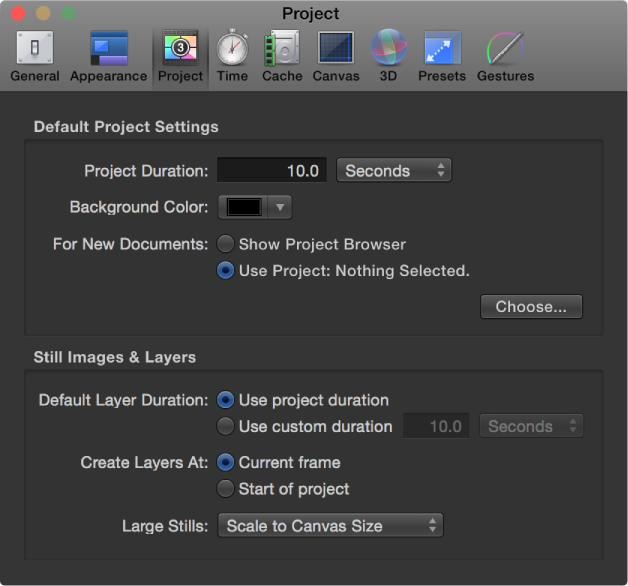

Project preferences affect project and layer duration and other project options.
Default Project Settings
These controls determine default values for new projects. These settings take effect in new projects created after you quit, then reopen Motion. To change the settings of an open project, use the Properties Inspector (press Command-J to open the Properties Inspector).
Project Duration: A value field that sets the default duration for new projects. You can enter a number into the value field and choose Frames or Seconds from the pop-up menu.
Background Color: A color control that sets the color of the background for any new projects created (but does not change the background color of the current project.)
Note: To render a new background color into your final output, you must choose Solid from the Background Color pop-up menu in the Properties Inspector (press Command-J to open it).
For New Documents: Buttons that set what occurs when you create a project:
Show Project Browser: Sets the Project Browser to appear whenever you create a project.
Use Project: Sets a specific saved project to be opened whenever you create a project. When you select Use Project, the Choose button becomes available. Click Choose to specify the project to be opened. (If the project you want does not appear in the browser, click Open Other to locate the project in the Finder.) For more information on bypassing the Project Browser, see Bypass the Project Browser.
Still Images & Layers
These settings control the default duration, placement, and size of still images and imported layers, as well as layers created in Motion, such as text, shapes, and masks.
Default Layer Duration: Buttons that set the duration of still images, generators, and other layers that lack an inherent duration. There are two options:
Use project duration: Sets all layers to have the same duration as the project.
Use custom duration: Sets a custom layer duration, defined in the adjacent value field.
Create Layers At: Buttons that set where new layers are placed in the Timeline. There are two options:
Current frame: Creates layers at the current playhead position.
Start of project: Creates layers at the first frame of the project.
Large Stills: A pop-up menu that sets the size of imported files. There are two options:
Do Nothing: Imports the image at its original size.
Scale to Canvas Size: Imports and scales the image to fit the project size while maintaining the file’s aspect ratio.
Note: For more information on the differences between the Large Stills options, see Set the import size of large still images.