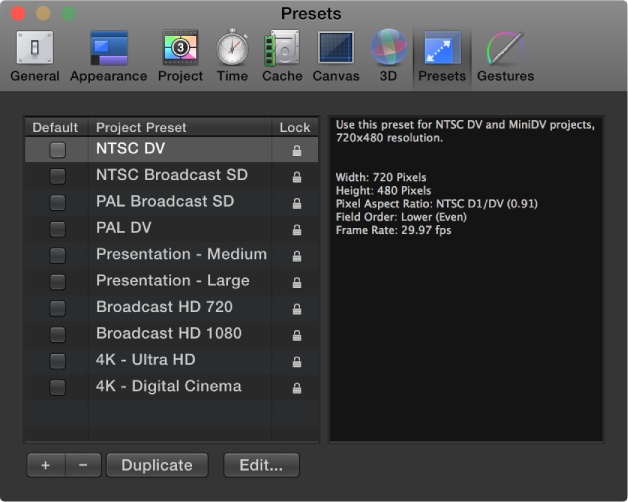

Presets preferences let you select a default project preset, which determines the settings assigned when you create a project. You can change any of these settings while you work by selecting the Project object in the Layers list, then clicking Properties in the Inspector.
After you set default project preset this pane, all new projects opened from the Project Browser are created with this setting (unless you choose another option from the Preset pop-up menu in the Project Browser).
Project Preset list: Displays the current list of presets. The checkbox to the left of each name identifies the default preset. The column on the right shows which presets are locked. Locked presets cannot be modified. You can duplicate a locked preset and edit the copy.
Default: A column of checkboxes used to designate the default project setting used for new projects. Check a different box to select a new preset.
Summary box (not labeled): To the right of the Project Preset list, the Summary box displays details of the selected preset.
Add Preset (+): A button that displays the Project Preset Editor dialog used to create a preset.
Delete Preset (–): A button that removes a preset selected in the Project Preset list above.
Duplicate: A button that creates a duplicate of the preset selected in the Project Preset list above.
Edit: A button that displays the Project Preset Editor, where you can modify preset settings.