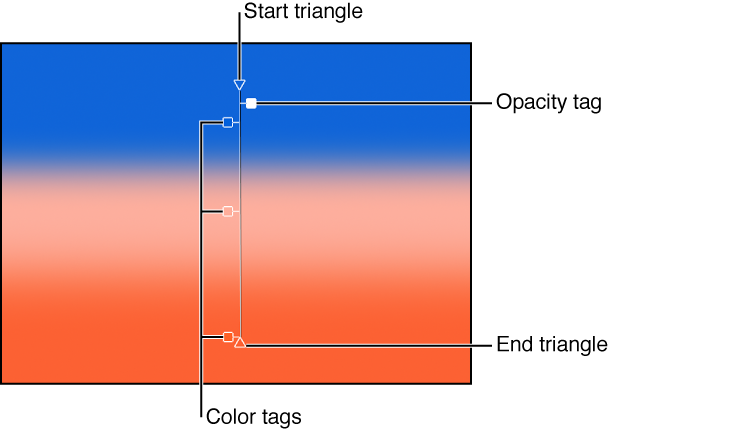

Onscreen controls provide a more interactive way to edit a gradient’s attributes—color, location and value of color tags and opacity tags, and start and end points—in the Canvas. You can also use onscreen controls to add color tags and opacity tags, as well as change their interpolation.
Do one of the following:
In the Canvas, Control-click the object with the applied gradient, then choose Edit Gradient from the shortcut menu.
In the toolbar, click and hold the 2D transform tools pop-up menu, then choose the Adjust Item tool.
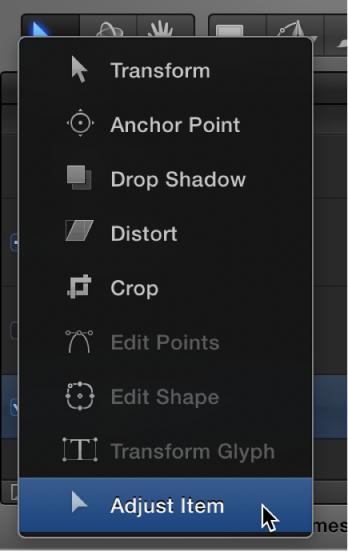
The onscreen controls appear.
Do one of the following:
In the Canvas, adjust the Start X and Y position of the gradient by dragging the top triangle (at the end of the gradient line).
In the Canvas, adjust the End X and Y position of the gradient by dragging the bottom triangle (at the end of the gradient line).
Do one of the following:
To change the location of gradient colors, drag the color tags along the gradient line in the Canvas.
To change the location of the gradient opacity, drag the opacity tags along the gradient line in the Canvas.
Do one of the following:
To add a color tag, double-click the gradient control line.
Control-click the gradient control line where you want the tag, then choose Add Color Tag or Add Opacity Tag from the shortcut menu.
Option-click the gradient control line where you want a color tag.
Option-Shift-click the gradient control line at the location where you want the tag.
Drag the color tag or opacity tag away from the gradient line and release the mouse button.
Control-click the tag, then drag the eyedropper in the pop-up color palette to select a color or opacity value. For Opacity, white represents more opaque values and black represents complete transparency. As you drag, the gradient is actively updated.
Do any of the following:
To change a tag’s interpolation, Control-click the gradient control line next to the tag, then choose Constant, Linear, or Continuous from the Color Interpolation submenu.
To reverse the direction of the gradient, Control-click the gradient control line, then choose Reverse Color or Reverse Opacity from the shortcut menu.
To evenly distribute the tags, Control-click the gradient control line, then choose Distribute Color from the shortcut menu to distribute color tags, or Distribute Opacity to distribute opacity tags.