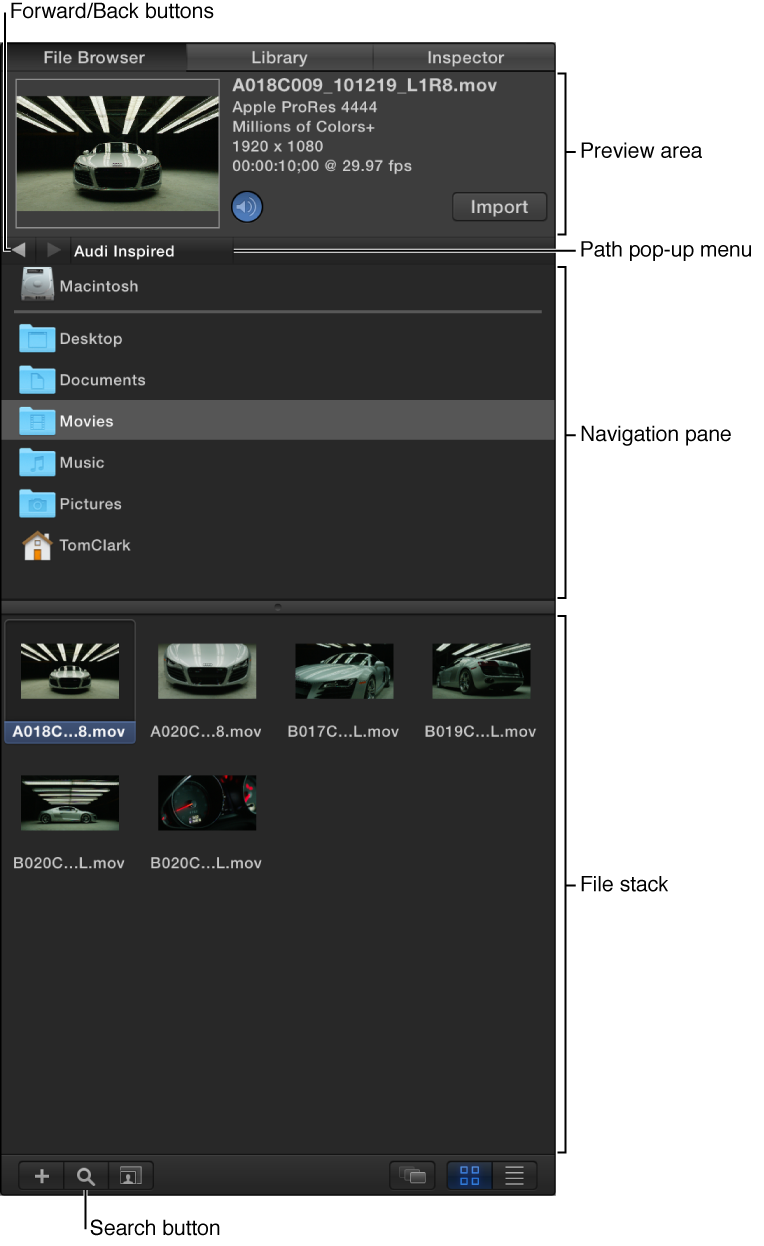

The easiest way to import external media files (video, audio, and still images on your computer or a connected storage device) into Motion is via the File Browser. When you open a Motion project, the File Browser is displayed on the left side of the workspace. The File Browser shows a hierarchal list of all files on your computer and networked storage devices. Navigating the File Browser is similar to navigating a window in the Finder.
The File Browser is divided into several areas:
Preview area: At the top of the File Browser, a thumbnail image displays a video preview of any file selected in the navigation areas of the browser, along with information about the selected file, including filename, media type, file size, and frame rate.
Navigation pane: Just below the Preview area is a list of servers, storage devices, and folders available on your computer. Navigation arrows and a pop-up menu let you step forward or back through recently viewed folders and devices.
File stack: When you select a server, device, or folder from the navigation pane, the contents of the selected item are shown in the lower area of the File Browser.
If the File Browser is not visible in the Motion workspace, you can easily show it.
Do one of the following:
Click File Browser in the top-left corner of the Motion workspace.
Choose Window > File Browser (or press Command-1).
Click the “i” button in the lower-left corner of the Motion workspace.