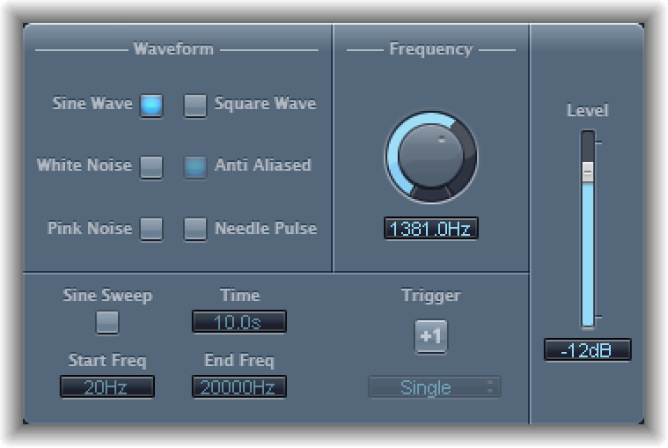

Test Oscillator is useful for tuning studio equipment and instruments and can be inserted as both an instrument or effect plug-in. It operates in two modes, generating either a static frequency or a sine sweep.
In the first mode, which is the default mode, it starts generating the test signal as soon as it is inserted. You can switch it off by bypassing it. In the second mode, which is activated by clicking the Sine Sweep button, Test Oscillator generates a user-defined frequency spectrum tone sweep when triggered with the Trigger button.
Test Oscillator parameters
Waveform buttons: Select the waveform to use for test tone generation. The Square Wave and Needle Pulse waveforms are available as either aliased or anti-aliased versions—the latter when used in conjunction with the Anti Aliased button. The Sine and Square waveforms are bipolar. The Needle Pulse waveform is a unipolar impulse waveform that is always positive, which makes it a useful tool for analyzing polarity or phase issues.
Note: The Waveform buttons are disabled when the Sine Sweep button is turned on.
Frequency knob and field: Set the frequency of the oscillator (the default is 1 kHz). You can also double-click this field and type in a value ranging from 1 Hz to 22 kHz, exceeding the possible values that can be set with the . If you enter “1”, this results in a 1 Hz test tone.
Sine Sweep button: Generate a sine wave sweep of the frequency spectrum you set with the Start Freq and End Freq fields.
Time field: Set the duration of the sine wave sweep.
Start/End Frequency fields: Set the oscillator frequency for the beginning and end of the sine sweep.
Sweep Mode pop-up menu (Extended Parameters area): Choose a type of sweep curve—Linear or Logarithmic.
Trigger button: Start the sine sweep.
Trigger pop-up menu: Choose the sine sweep mode.
Single: Triggers the sweep once.
Continuous: Triggers the sweep indefinitely.
Level slider and field: Set the overall output level.