
 When Show Advanced Tools is selected in the Advanced preferences pane, you can quantize regions with greater precision using the advanced quantization parameters in the Region inspector. Using the advanced parameters, you can apply a swing or other quantize feel to MIDI regions. Not all advanced quantization parameters are available for audio regions.
Advanced quantization parameters in the Region inspector include the following:
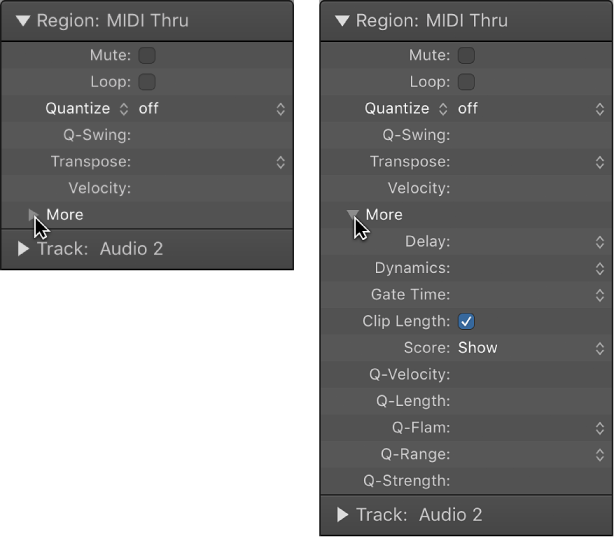
In the Region inspector, the Q-Swing field is located below the Quantize pop-up menu. The other advanced quantization parameters are available by clicking the More disclosure triangle. They can be applied to any quantization value (except “off”).
Q-Swing: Alters the position of every second point in the current quantization grid. Values over 50% delay the beats; values under 50% pre-delay (advance) them. The most practical settings are between 50% and 75%, which give a swing feel to strictly quantized (or tightly played) regions.
Q-Strength: Determines how far a note or transient marker is shifted toward the nearest grid position. A value of 100% results in full quantization, and 0% leaves the note or transient marker at its recorded position.
Q-Range: Q-Range is ideal for recordings that already have the right groove but are too hurried or laid back in places. It lets you retain the original feel, but positions the rhythmic center precisely in the groove. A value of 0 means that every note or transient marker is quantized. Negative Q-Range values move only notes or transient markers that fall outside the set range to ideal quantization grid positions, while those closer to an ideal position are not quantized. In this case, the most poorly played notes or transient markers—those outside the range—are moved to perfect timing positions on the quantization grid (or closer to these positions, depending on the Q-Strength setting).
Tip: To obtain the best Q-Range results, use a low, even Quantize value, such as 1/4 note. Set the Q-Range parameter to compensate for the maximum error in the recording.
Q-Flam: Spreads out notes with the same time position, such as chords. Positive values produce an ascending (upward) arpeggio, negative values a descending (downward) arpeggio. The position of the first note (either the bottom or top note) is unaltered.
Q-Velocity: Determines how much the velocity values of quantized notes are affected by the velocity values of a template MIDI region. At a value of 0%, the notes retain their original velocity. At 100%, they adopt the velocity values of the template. Negative values alter the velocity, making the deviation from the template even greater.
Q-Length: Determines how the lengths of quantized notes are affected by the equivalent note lengths (notes at the same position) of a template MIDI region. A value of 0% has no effect, whereas at 100% the notes adopt the exact note lengths of the template region. Negative values alter note lengths further, resulting in a more significant deviation from the template.