
You can use External Instrument to route hardware MIDI sound generators through the Mixer, which you can then process with Logic Pro effects. The plug-in is inserted into instrument channel strips in place of a software instrument. External Instrument supports MIDI communication through the instrument channel strip, enabling you to control both MIDI and audio routing of an external sound module with a single plug-in.
The track routed to an instrument channel strip that is being used for an external MIDI sound module behaves just like a standard software instrument track. This enables you to record and play back MIDI regions on it, with the following benefits:
You can use the sounds and synthesis engine of your MIDI module with no overhead on the computer CPU—apart from effects used in the channel strip (or destination channels).
You can use insert and send effects. To use send effects, route the instrument channel strip to aux channel strips.
You can bounce external MIDI instrument parts, with or without effects, to an audio file in real time (bouncing cannot happen faster because MIDI hardware is involved). This makes the creation of a mix, including all internal and external devices and tracks, a one-step process.
Tip: To avoid constant repatching of devices, it is best to use an audio interface that supports multiple inputs and outputs.
Tip: When using multitimbral MIDI sound sources, you can gain maximum flexibility with multiple External Instrument instances. In this situation, connect a separate audio output of the tone generator (if equipped with multiple outputs) to different inputs on your audio interface—each addressed by an individual External Instrument instance.
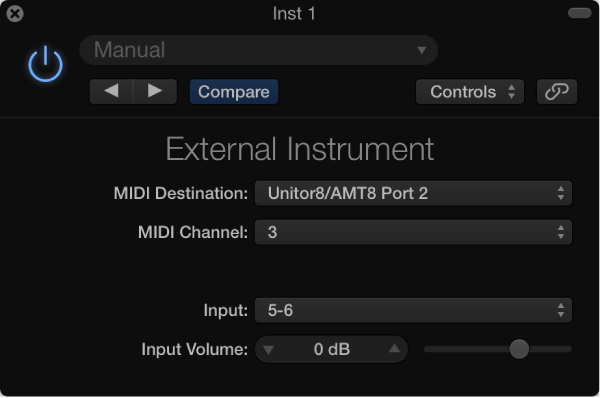
MIDI Destination pop-up menu: Choose the target MIDI port.
MIDI Channel pop-up menu: Choose the target MIDI channel.
Input pop-up menu: Choose the inputs of your audio hardware that the MIDI sound generator is connected to.
Input Volume slider and field: Set the incoming signal level.
Connect the output (or output pair) of your MIDI module with an input (or input pair) on your audio interface.
Note: These can be either analog or digital connections if your audio interface and MIDI sound generator are equipped with either, or both.
Create an instrument channel strip (or several, if using a multitimbral sound source).
Click the Instrument slot, then choose External Instrument from the pop-up menu.
Choose the MIDI Destination from the pop-up menu in the External Instrument window.
Choose the MIDI Channel from the pop-up menu in the External Instrument window.
Choose the input (of your audio interface) that the MIDI sound generator is connected to from the Input pop-up menu.
Adjust the Input Volume, if necessary.
Insert any required effects into the Insert slots of the channel strip (or channel strips, if you are using multiple External Instrument instances with a multitimbral sound source).
You can also route the instrument channel strip to aux channel strips, if you want to use send effects.