
MultiMeter provides a collection of professional gauge and analysis tools in a single window. It includes:
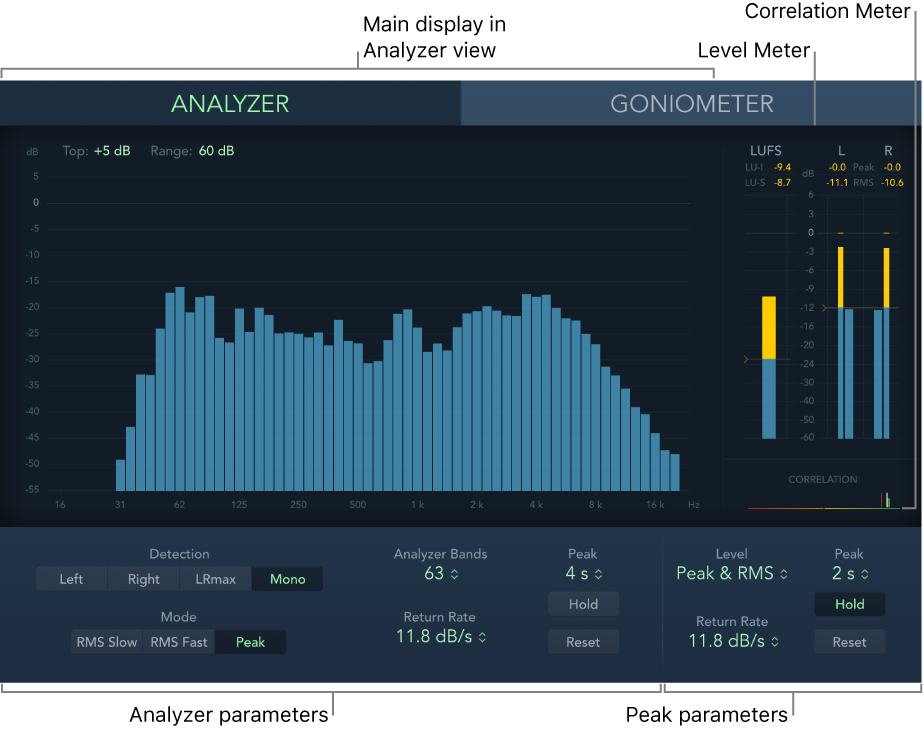
An Analyzer to view the level of each 1/3-octave or major second frequency band.
A Goniometer for judging phase coherency in a stereo sound field.
Level and Loudness Meters to view the signal level and perceived loudness (conforming to the AES 128 specification) for each channel.
A Correlation Meter to spot mono phase compatibility.
You can view either the Analyzer or Goniometer results in the main display area. Use the Analyzer or Goniometer buttons to switch between modes and to set parameters. The Loudness/Level and Correlation meters are always visible in the Full display, as are several common parameters.
You can set a size by dragging the lower corners of the plug-in window. The View pop-up menu provides further Display, Meters, or Full items that show a partial view or the complete plug-in interface. Control-click in the main display when a partial view is enabled to switch between modes.
Although you can insert MultiMeter directly into any channel strip, it is more commonly used in the master channel strip of Logic Pro X—when you are working on the overall mix.
There is also a surround version of MultiMeter, with parameters for each channel and a slightly different layout. See Surround MultiMeter overview.