
The Balance/Correlation Meter gauges the balance or sound placement between all incoming signals. Strongly correlated signals are shown as sharp markers and less strongly correlated signals are shown as a blurred area.
Balance button: View the Correlation Meter in the main display.
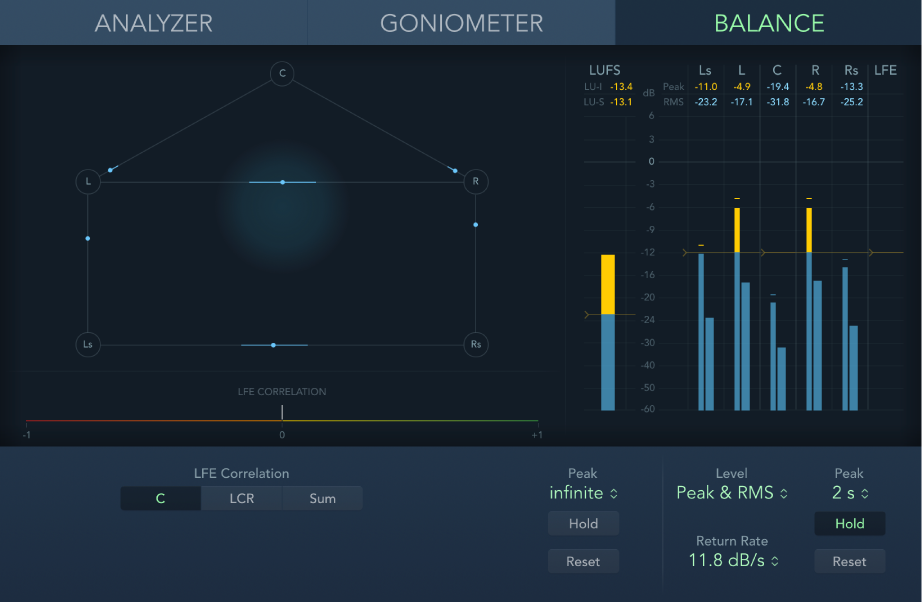
Depending on the chosen surround format, a number of points that indicate speaker positions are shown (L, R, C, Ls, and Rs in a 5.1 configuration are displayed in the figure). Lines connect these points. The center position of each connecting line is indicated by a blue marker.
A gray ball indicates the surround field/sound placement. As you move the surround panner of the channel strip, the ball in the Correlation Meter mirrors your movements. The blue markers also move in real time, with shaded gray lines indicating the divergence from the centered positions on each of the connecting lines.
LFE Correlation Meter: The horizontal area around the white correlation indicator denotes phase correlation deviations in real time. This is shown in both directions. LFE Correlation Meter scale values indicate the following:
A +1 correlation value indicates that the signal is balanced.
Correlation values in the yellow/green zone (between +1 and the middle position) indicate that the signal is mono compatible.
The middle position indicates the highest allowable amount of channel divergence.
When the meter moves into the red area to the left of the center position, out-of-balance material is present.
LFE Correlation buttons: Choose the channels shown by the correlation meter.