
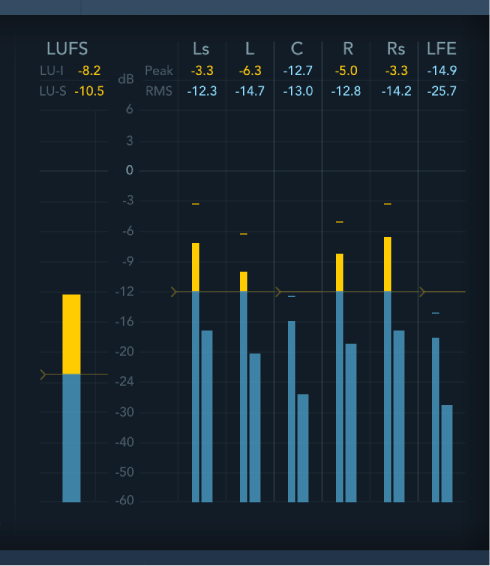
The Loudness Meter to the left of the Level Meter shows the momentary loudness level. Loudness indicates the perceived level of a signal which is indicative of human hearing, making it a useful reference tool when mixing or mastering. The Loudness Meter conforms to the AES 128 specification.
Loudness is measured in Loudness Units, relative to Full Scale (LUFS). Each LU is equivalent to one decibel. Surround MultiMeter provides two indicators above the Loudness Meter. You can freely drag the target level indicator.
LU-I field: Loudness Unit-Integrated, which indicates the perceived level from start to end of the program material.
LU-S field: Loudness Unit-Short term, which indicates the perceived level of the most recent 3 seconds of program material.
The Level Meter displays the current signal level on a logarithmic decibel scale. The signal level for each channel is represented by a blue bar. Signals (above the draggable target level) approaching the 0 dB level are represented by a yellow bar. When the level exceeds 0 dB, the portion of the bar above the 0 dB point turns red.
Peak values are displayed numerically (in dB increments) above the Level Meter. Click in the display to reset peak values.
Level pop-up menu: Choose how levels are displayed from Peak, RMS, Peak & RMS, True Peak, or True Peak & RMS characteristics.
The two RMS modes show the effective signal average and provide a representative overview of perceived volume levels.
The True Peak options display interpolated sample values.
The Peak mode shows level peaks accurately.
Return Rate pop-up menu: Choose how quickly analyzed signals return from peak/maximum levels to zero or incoming signal levels. This is expressed in dB per second.
Peak pop-up menu: Choose the hold time for the Level Meter. Choose 2, 4, or 6 seconds—or infinite.
Note: The Hold button must be turned on for the selected time value to have an effect.
Hold button: Turn on to show a small yellow segment above each level bar which indicates the most recent peak level.
Reset button: Reset all values in the Level Meter.