
DeEsser 2 is a frequency-specific compressor, designed to compress a particular frequency band within a complex audio signal. It is used to eliminate sibilance (overly emphasized “s” sounds, especially in vocals, and plosives such as “t” sounds that can be emphasized by compressor and saturation effects) from the signal. DeEsser 2 compresses the signal dynamically, preventing the sound from becoming darker when no sibilance is present. DeEsser 2 has extremely fast attack and release response times for the shortest of transients, thus retaining a natural sound.
DeEsser 2 provides two operating modes that enable you to work with high or low energy signals. Also included are two filter shapes and range parameters that are used to define and control the affected frequencies.
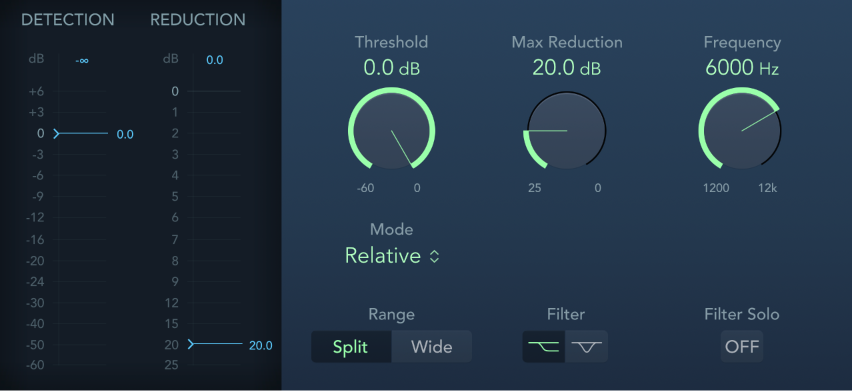
Detection meter: Shows the input signal level. The maximum level is shown in the numerical display above the meter. Click to reset. Behavior of the meter changes in Absolute or Relative mode. See Mode pop-up menu description.
Detection meter slider: Drag to set the Threshold above which gain reduction is applied.
Reduction meter: Shows the amount of gain reduction applied. The maximum level is shown in the numerical display above the meter. Click to reset.
Reduction meter slider: Drag to set the Maximum Reduction level.
Threshold knob and field: Set the Threshold above which gain reduction is applied.
Max Reduction knob and field: Set the amount of gain reduction applied.
Frequency knob and field: Set the center frequency of the detection filter.
Mode pop-up menu: Choose Relative or Absolute mode. Relative is the default and works with low and high energy signals.
Relative: In this mode the energy level of the band/high passed signal (determined by the Frequency and Filter settings) is compared with the full bandwidth energy level of the incoming signal. The Threshold parameter value determines the amplification of the filtered signal energy (because the energy of the filtered signal will always be lower than the full bandwidth signal). When the amplified signal is lower than the full bandwidth signal, the Detection meter shows a blue meter below the Threshold value and no processing occurs. When the amplified signal surpasses the full bandwidth level, the Detection meter shows a yellow meter above the Threshold value and processing takes place.
Absolute: The Detection level meter shows the energy of the incoming signal (band/high passed as set with the Frequency and the Filter settings). When the energy level surpasses the Threshold parameter value the meter display switches from blue (not processed) to yellow (processed). Low energy signals can only be processed in Absolute mode if the Threshold parameter is set to a very low value.
Range buttons: Set the filter frequency range. Split affects signals tightly centered around the set Frequency value. Wide affects a broader spectrum around the set Frequency value.
Filter buttons: Choose a highpass shelving or peak filter shape.
Filter Solo button: Turn on to hear the filtered signal in isolation. This is useful for setting Threshold and Frequency values.