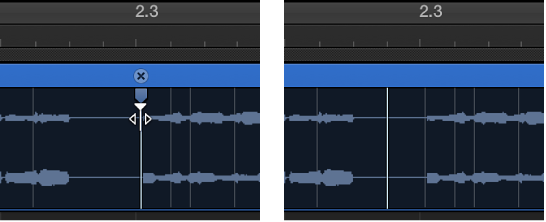
Flex Time is also available in the Audio Track Editor, when Show Advanced Tools is selected in the Advanced preferences pane.
When you delete a flex marker, any time changes that occurred in the area around the flex marker are either removed—resetting the audio material to its original position—or reset according to the time-stretching offset of the previous flex marker or region start position and the following flex marker or region end position.
You can delete only those flex markers that were manually added or all flex edits that were carried out on the audio file, which includes audio quantization.
You can also change the position of a flex marker in an audio region without changing the timing of the audio material before or after the flex marker.
Flex Time is also available in the Audio Track Editor, when Show Advanced Tools is selected in the Advanced preferences pane.
Do one of the following:
Place the pointer over the flex marker, then click the “x” symbol in the region header.
Double-click the flex marker.
Drag across the flex marker with the Eraser tool.
Important: Use the Eraser tool in the body of the waveform only. Using it in the region header deletes the entire region.
Control-click the flex marker, then choose Delete Flex Marker from the shortcut menu.
Drag across multiple flex markers with the Eraser tool.
Important: Use the Eraser tool in the body of the waveform only. Using it in the region header deletes the entire region.
Control-click the region background, then choose Reset Manual Flex Edits from the shortcut menu.
Control-click the region background, then choose Reset All Flex Edits from the shortcut menu.
All flex markers are deleted, including any that were placed automatically—during the audio quantization process, for example.
Control-click the flex marker, then choose Set To Neutral Position from the shortcut menu.
The flex marker moves to the same position the audio sample would have moved to if the flex marker had been deleted.
Hold down Option while you drag the flex marker.